Teams
A team is a named group of workspace members — Payments, Platform, Identity — and the links people use to reach it: a contact e-mail, a chat channel, an on-call schedule and its documentation. Teams are the owners of projects, catalog items, MCP endpoints, consumers and connectors. A team is the only kind of group in a workspace.
Go to Workspace → Teams to see them. Teams are created and changed with the
apiome teams command or the REST API.
Team pages
Teams lists every team with its handle, how many members it has and its links. Click a team's name to open its page.
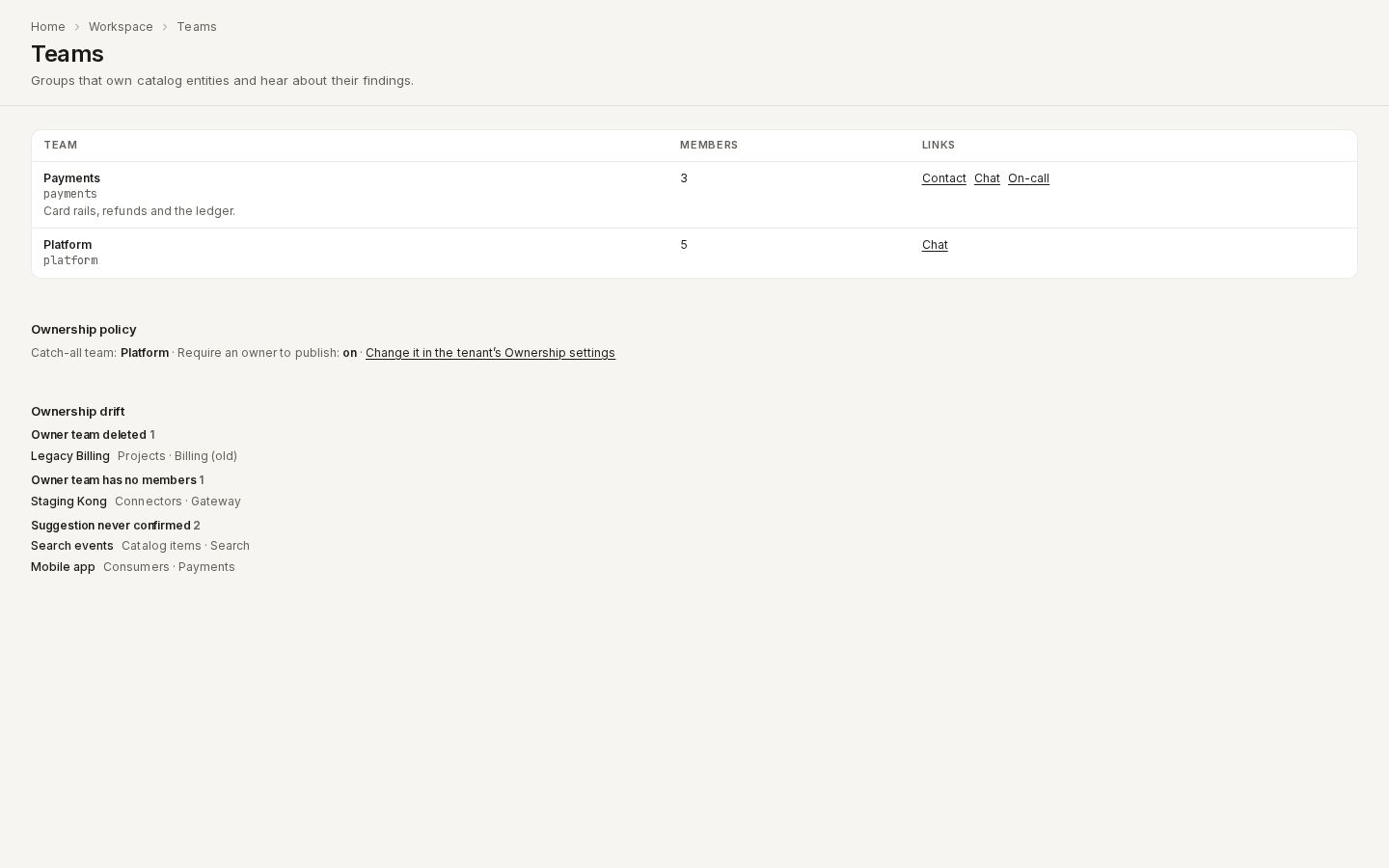
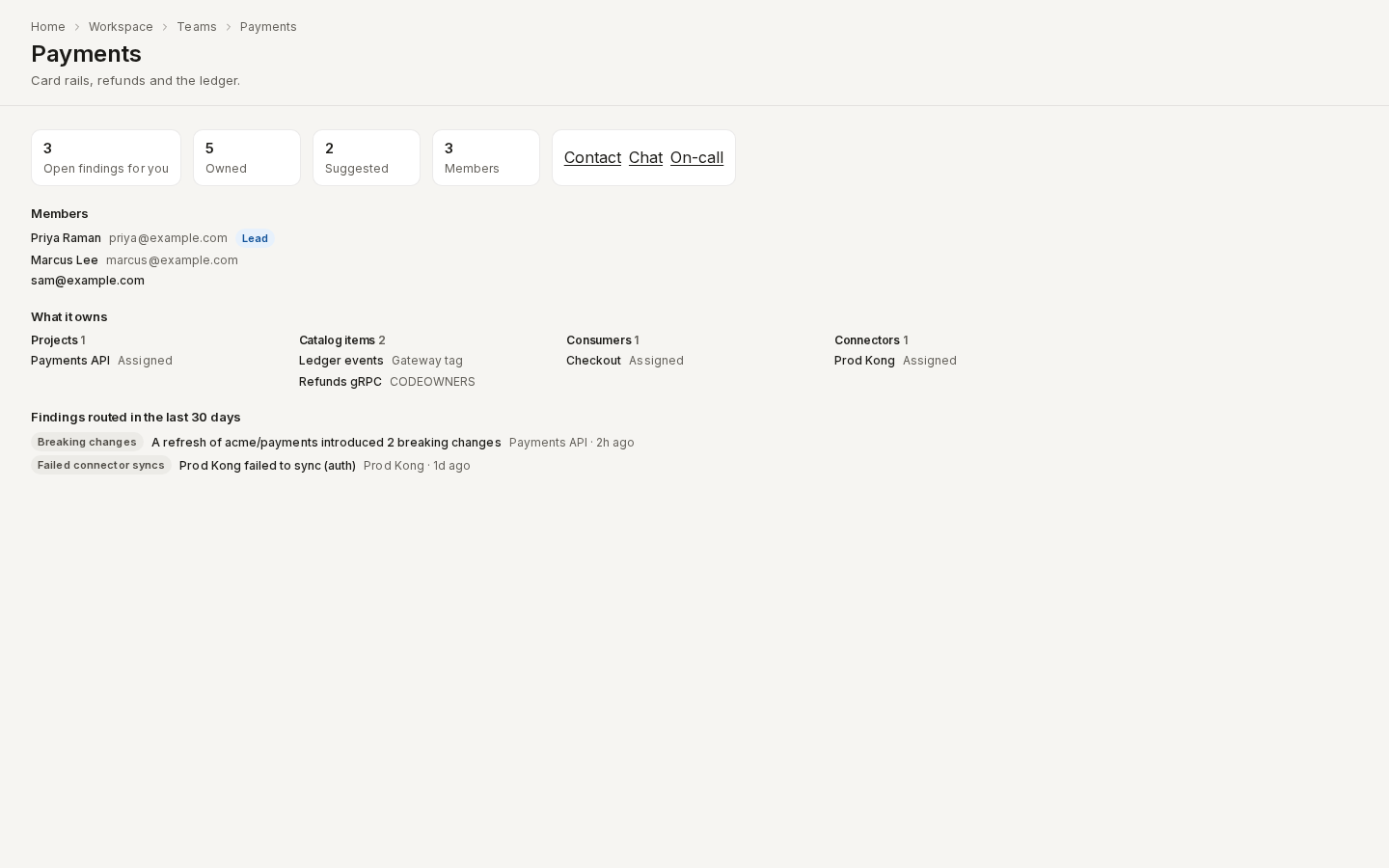
/ade/dashboard/teamsA team's page shows, top to bottom:
- Open findings for you — your unread owner findings for this team, the same ones your bell counts; click it to open your notifications. Owned, Suggested and Members count the rest, and the team's links sit beside them.
- Members, leads first.
- What it owns, grouped by kind — projects, catalog items, MCP servers, consumers and connectors — each with how it became the owner (Assigned, Gateway tag, CODEOWNERS, …).
- Findings routed in the last 30 days, newest first, one row per finding however many members it reached.
/ade/dashboard/teams/paymentsWhat a team holds
| Field | What it is |
|---|---|
slug | The team's handle, for example payments: lowercase letters, digits and hyphens. Made from the name when you leave it out. It cannot be changed — gateway tags such as owner:payments and the x-apiome-owner extension refer to it |
name | What people read, for example Payments |
description | What the team does (optional) |
contact_email | A shared mailbox (optional) |
chat_url, oncall_url, docs_url | Links to the team's chat channel, on-call schedule and documentation (optional; each must start with http:// or https://) |
Each slug is unique among the workspace's teams. Once a team is deleted, its slug is free to use again.
Members
Each member is a lead or a member. Everyone on a team must already be a member of the workspace — invite them on Members & seats first.
Setting the members always sends the whole list: anyone left out is removed, and an empty list empties the team. If someone on the list is not in the workspace, nothing changes and the reply names them.
When someone leaves the workspace, they leave every team they were on at the same moment.
Delete a team
Deleting a team removes it from every list, and its slug is free again. Its history stays in the access audit.
A team that is the confirmed owner of anything cannot simply be deleted: the request is refused with how many
entities it owns. Name another team with reassign_to and those entities move to it as the team is
deleted.
Ownership
Every project, catalog item, MCP endpoint, consumer and connector can have an owner: a team. An owner is either:
- Confirmed — the team responsible for the entity. Findings about the entity are routed to it. There is at most one.
- Suggested — a team an importer found evidence for. Each suggestion shows where it came from, and nothing is ever sent to a suggested owner. There can be several.
A suggestion only becomes the owner when someone confirms it, and the access audit records who did.
Where suggestions come from
| Source | Evidence | Becomes a suggestion for |
|---|---|---|
gateway_tag | A Kong tag owner:payments, or an AWS API Gateway tag apiome:owner = payments (see Connectors) | The catalog item the connector synced |
codeowners | A CODEOWNERS rule naming @your-org/payments for the spec's path — the file in .github/, the repository root or docs/, last matching rule wins | The project or catalog item imported from that path |
spec_extension | x-apiome-owner: payments at the root of the document, or info.contact.name: payments | The project or catalog item the import wrote |
Only team slugs count. A suggestion naming a team that does not exist is not stored. A connector
says so in its run's findings — unknown team ghost in tag — so you can create the team or fix the
tag. CODEOWNERS owners that are people (@alice) or e-mail addresses are not suggestions.
Suggestions refresh on every sync, scan and import: when the tag, rule or extension goes away, so
does the suggestion.
Confirm or assign an owner
On Catalog, Projects, MCP servers, Published and a project's Consumers:
- the Owner column (or, on cards, the line under the summary) shows each entity's owner, and a suggestion's Suggested badge says where it came from;
- click “Confirm” next to a suggestion to make it the owner — the row updates without reloading;
- Owner in the toolbar narrows the list to one team; the choice is kept in the address
(
?team=payments), so a filtered list can be shared; - on Catalog and Projects, tick rows and use Assign owner in the bar at the bottom of the page: choose a team and click “Assign owner” to make it the owner of every selected item.
From the command line, apiome teams assign <kind> <id> --team <slug> assigns one owner; an unknown
team is refused with a non-zero exit. Over the API:
- Confirm a suggestion:
POST /v1/tenants/{tenant}/owners/{kind}/{id}/confirm, with{"team": "payments"}— or{}when only one team is suggested. The owner keeps its source and records who confirmed it. - Assign any team:
PUT /v1/tenants/{tenant}/owners/{kind}/{id}with{"team": "platform"}. - Assign one team to many entities:
POST /v1/tenants/{tenant}/owners:assignwith{"team": "platform", "entities": [{"kind": "catalog_item", "id": "…"}]}(up to 200; all or nothing). - Remove the owner:
DELETE /v1/tenants/{tenant}/owners/{kind}/{id}. Suggestions stay, and an owner that came from a suggestion becomes a suggestion again. - See an entity's owner and suggestions:
GET /v1/tenants/{tenant}/owners/{kind}/{id}.
kind is project, catalog_item, mcp_endpoint, consumer or connector. Who may change an
owner is whoever may edit the entity: projects:edit for projects, catalog items and MCP endpoints,
consumer_contracts:edit for consumers and imports:edit for connectors. Reading needs the matching
view. Every change is in the access audit as owner.assign, owner.confirm, owner.remove,
owner.bulk_assign, or — when an importer changes the suggestions — owner.suggestions.
What an owner team hears about
Lint regressions, breaking changes on refresh, verification drift, failing deploy gates, MCP trust
drift, shadow APIs and failed connector syncs reach the confirmed owner team: a notification for
each member and one message to the team's chat_url. See
Notifications → Owner findings. Without a confirmed owner the
finding goes to the Unowned findings report — and, when the workspace has a catch-all team
(set in the tenant's Ownership settings), to that team as well; its
notifications say they came because nobody owns the entity.
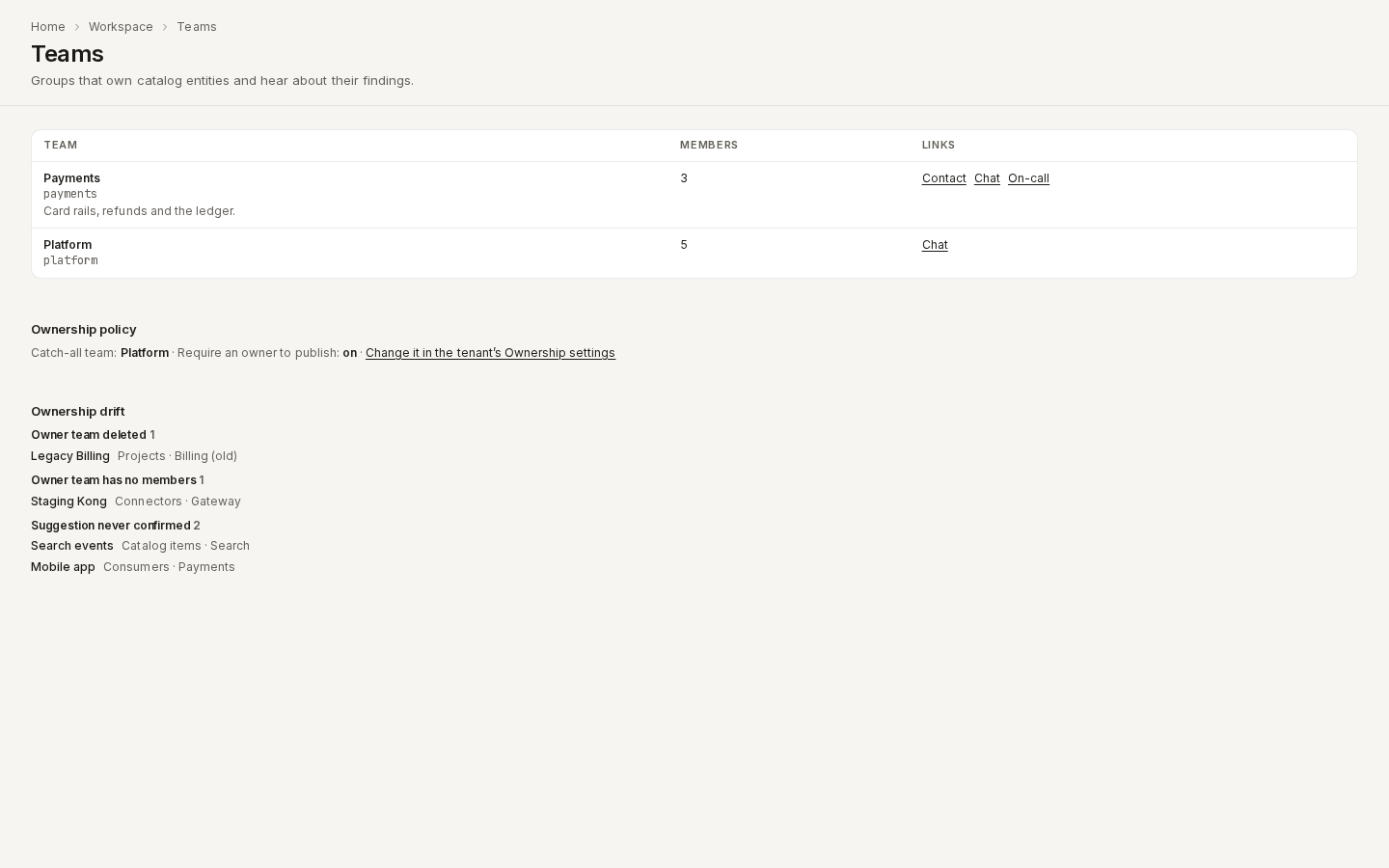
Ownership policy
Two workspace settings, changed in the tenant's Ownership settings and shown read-only under the Teams list:
- the catch-all team for findings on unowned entities;
- Require an owner to publish — a version of a project with no confirmed owner is refused with
reason
no-owner(see Publish a version).
Ownership drift
Under the Teams list, Ownership drift lists ownership that has quietly stopped working:
| Reason | Means |
|---|---|
| Owner team deleted | The confirmed owner is a deleted team, so findings reach nobody |
| Owner team has no members | The owner team is empty, so its notifications reach nobody |
| Suggestion never confirmed | A suggested owner nobody confirmed in 30 days, on an entity with no owner |
Each row names the entity (linked to its page) and the team. Fix it by assigning another owner, adding members, or confirming the suggestion.
/ade/dashboard/teamsOwnership facts
GET /v1/tenants/{tenant}/owners/{kind}/{id} returns two facts about the entity, the ones
scorecard ladders read (all of an entity's facts are on Scorecards):
| Fact | True when |
|---|---|
owner.present | The entity has a confirmed owner team that has not been deleted |
owner.contactable | That team has an on-call link or a chat link |
The catalog, project, MCP endpoint and consumer lists show each entity's owner as
owner: {team, status, source}: the confirmed owner, or else its first suggestion with
status: "suggested". See the Owners API reference.
Permissions
Teams have their own row in the permission matrix, Teams
(teams):
| Role | Teams permissions |
|---|---|
| Owner, Admin | View, create, edit (including members) and delete |
| Editor, Viewer | View |
A team decides who is told about — and paged for — what it owns, so changing teams is kept with
the people who run the workspace. Give a custom role teams:edit to let it manage membership.
Every change is recorded in the workspace's
access audit as
team.create, team.update (each changed field, old and new), team.members.replace (who was
added, removed or changed role) or team.delete.
With the API
See the Teams API reference:
| Call | Does | Needs |
|---|---|---|
GET /v1/tenants/{tenant}/teams | Every team, with its links and member count | teams:view |
POST /v1/tenants/{tenant}/teams | Create a team | teams:create |
GET /v1/tenants/{tenant}/teams/{slug} | One team and its members, leads first | teams:view |
PATCH /v1/tenants/{tenant}/teams/{slug} | Change the name, description or links; null clears one | teams:edit |
PUT /v1/tenants/{tenant}/teams/{slug}/members | Replace the members ([{"user_id", "role"}]) | teams:edit |
GET / PUT /v1/tenants/{tenant}/ownership-policy | Read or change the catch-all team and Require an owner to publish | teams:view / teams:edit |
GET /v1/tenants/{tenant}/ownership-drift | The Ownership drift report | teams:view |
GET /v1/tenants/{tenant}/teams/{slug}/activity | What it owns, your open findings for it, and the findings routed to it in the last 30 days | teams:view |
DELETE /v1/tenants/{tenant}/teams/{slug} | Delete; add ?reassign_to=<slug> when it owns entities | teams:delete |
For example, to create a team and make yourself its lead:
curl -X POST "$APIOME/v1/tenants/acme/teams" \
  -H "Authorization: Bearer $TOKEN" -H "Content-Type: application/json" \
  -d '{"name": "Payments", "chat_url": "https://chat.example.com/c/payments"}'

curl -X PUT "$APIOME/v1/tenants/acme/teams/payments/members" \
  -H "Authorization: Bearer $TOKEN" -H "Content-Type: application/json" \
  -d '{"members": [{"user_id": "<your user id>", "role": "lead"}]}'
What a refusal means:
| Status | detail.code | Why |
|---|---|---|
| 400 | team-invalid | A malformed slug, a blank name, a link that is not http(s), a bad e-mail, or a user listed twice |
| 400 | team-reassign-invalid | reassign_to names the team being deleted, or no team |
| 404 | team-not-found | No team has that slug |
| 409 | team-slug-taken | Another team already has that slug |
| 409 | team-owns-entities | The team owns entities; detail.owned_count says how many |
| 422 | team-member-not-in-tenant | Someone on the list is not a workspace member |