SDK settings
/ade/dashboard/sdk-settings
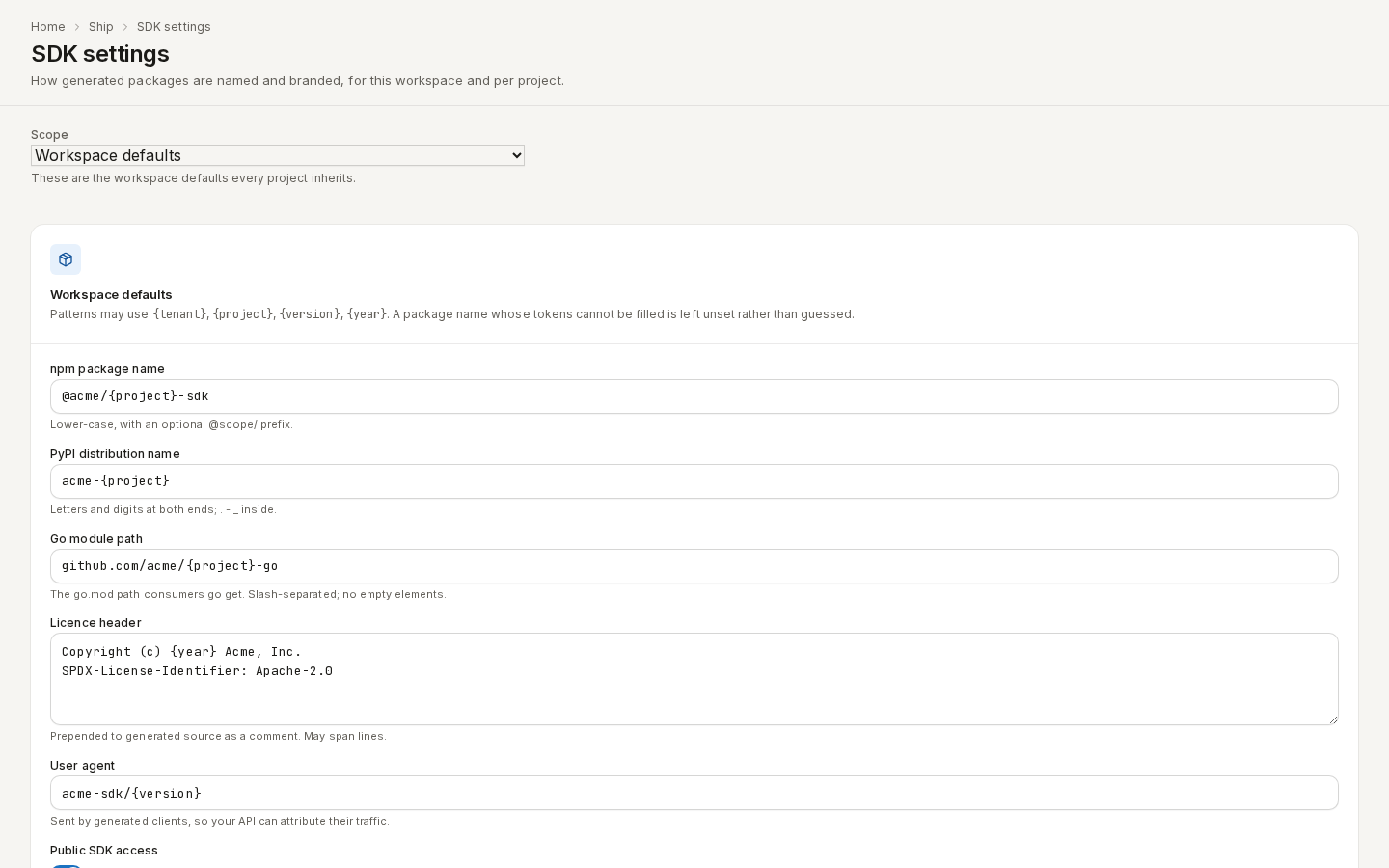
SDK settings decide how generated packages are named and branded — the npm, PyPI and Go names, the licence header and the user agent — for the whole workspace and per project, and whether visitors to a published version can download an SDK. Go to Ship → SDK settings.
/ade/dashboard/sdk-settingsYou need projects:edit (or workspace admin) to change them. Other members see the form disabled,
with Read-only for members.
Choose a scope
Scope is either Workspace defaults — what every project inherits — or one project. The line under it says where the values come from, for example This project overrides some of the workspace defaults. or Nothing is configured, so generated artifacts carry no branding.
At project scope every field has an Inherit from workspace checkbox. Ticked, the field takes the workspace default. Unticked and empty, the project deliberately has none.
Set the names and branding
Patterns may use {tenant}, {project}, {version} and {year}. A name whose tokens cannot be
filled is left unset rather than guessed.
| Field | Example | Rule |
|---|---|---|
| npm package name | @acme/{project}-sdk | Lower-case, with an optional @scope/ prefix. |
| PyPI distribution name | acme-{project} | Letters and digits at both ends; . - _ inside. |
| Go module path | github.com/acme/{project}-go | The go.mod path consumers go get; slash-separated. |
| Licence header | Copyright (c) {year} Acme, Inc. | Prepended to generated source as a comment; may span lines. |
| User agent | acme-sdk/{version} | Sent by generated clients, so your API can attribute their traffic. |
- Choose a scope and fill in the fields.
- Click “Save”. The foot reads Unsaved changes, then Saved. If the server rejects a value, every problem is listed above the form.
- “Clear defaults” (or “Clear override” on a project) removes this scope's saved settings at once — there is no confirmation.
The In force panel shows what the settings resolve to right now, after the workspace and project
are merged — for example npm: @acme/petstore-sdk · pypi: acme-petstore — with a fingerprint of
the settings.
Public SDK access and “Get SDK”
Public SDK access is off by default. Turn it on (Anyone can download the SDK) and anonymous visitors to a public published version see a Get SDK panel on the public portal (Browse published specs):
- Packages — the package names above, each with a copyable install command;
- What you get — runnable examples per operation (TypeScript, Python, cURL), the published specification exactly as written, and a manifest naming the version it came from;
- “Download SDK” — the client kit as a zip.
Off, the portal shows no SDK download and no code examples, and their URLs return 404. A project can turn it off even when the workspace turns it on. There is no SDK download in the Apiome app itself.
With the API
| What | Route |
|---|---|
| Workspace defaults | GET / PUT / DELETE /v1/tenants/{tenant}/governance/sdk-generation-settings |
| A project's settings | GET / PUT / DELETE /v1/projects/{tenant}/{project}/sdk-settings |
| What Get SDK shows | GET /v1/browse/tenants/{tenant}/projects/{project}/versions/{version}/sdk |
| Download the kit | GET /v1/browse/tenants/{tenant}/projects/{project}/versions/{version}/sdk/download |
Reading needs projects:view, changing needs projects:edit. See the
API reference.