Schema registry subjects
The schema registry gives your Avro, JSON Schema and Protobuf schemas what a Kafka-style registry expects: named subjects, integer schema ids and numbered versions. It keeps the schemas themselves in the catalog — every subject version is a catalog item revision — so there is one place schemas live.
Concepts
| Term | Meaning |
|---|---|
| Subject | A name schemas are registered under, for example orders-value. Unique among your tenant's live subjects. |
| Version | A subject's 1st, 2nd, 3rd … schema. Each version points at the catalog item revision that holds it. |
| Schema id | A number for the schema's content, counted per tenant (1, 2, 3 …). The same schema under two subjects has one id. |
| Strategy | How the subject name was chosen: topic, record or topic_record (see below). |
| Compatibility level | NONE, BACKWARD, BACKWARD_TRANSITIVE, FORWARD, FORWARD_TRANSITIVE, FULL or FULL_TRANSITIVE. A subject without one uses the tenant default (BACKWARD until you change it). |
| Mode | READWRITE or READONLY. A READONLY subject — or a READONLY tenant default — refuses new versions. |
How a level is used today is under Compatibility levels.
What a version is
When you register a schema, Apiome reads it with the same importer a catalog upload uses (Avro, JSON Schema or Protobuf) and computes its fingerprint — a hash of the parsed schema, so the order of keys or whitespace does not matter. Then:
- The subject already holds that schema — you get its existing version and id back. Nothing is
created (
created: false). - Another subject holds that schema — the subject gets a new version with the same schema id, pointing at the same catalog revision. Nothing is imported.
- The schema is new to your tenant — it is imported as a new revision of the subject's catalog item and gets the next schema id. The first registration under a subject creates that catalog item, named after the subject.
So registering the same schema twice always returns the same id and creates one revision.
Connect a Kafka client
Apiome serves the Confluent Schema Registry API, so confluent-kafka, kafka-avro-serializer
and Spring Kafka work against it with no code change — only their configuration:
- Create a key under Workspace → API keys with the Schema registry: read + write preset for a producer, or Schema registry: read for a consumer (see A key for a Kafka serializer).
- Point the client at
https://<your-apiome-host>/registry/schema/<tenant>. Workspace → Schema registry shows your workspace's exact URL and these snippets with it filled in — see Registry settings. - Send the key as the basic-auth password. The user name can be anything.
Python (confluent-kafka)
from confluent_kafka.schema_registry import SchemaRegistryClient

registry = SchemaRegistryClient({
    "url": "https://<your-apiome-host>/registry/schema/acme",
    "basic.auth.user.info": "orders-producer:<api-key>",
})
Java (kafka-avro-serializer)
schema.registry.url=https://<your-apiome-host>/registry/schema/acme
basic.auth.credentials.source=USER_INFO
basic.auth.user.info=orders-producer:<api-key>
Spring Kafka (application.yml)
spring:
  kafka:
    properties:
      schema.registry.url: https://<your-apiome-host>/registry/schema/acme
      basic.auth.credentials.source: USER_INFO
      basic.auth.user.info: orders-producer:<api-key>
A bearer token works too (bearer.auth.credentials.source=STATIC_TOKEN with the key as
bearer.auth.token). The API answers with application/vnd.schemaregistry.v1+json and supports
/subjects, /subjects/<s>/versions, the subject lookup POST /subjects/<s>, /schemas/ids/<id>
(also …/subjects and …/versions), /schemas/types, /config, /mode and /compatibility —
the full list is on the Schema registry reference page.
Deleting a subject is a soft delete; DELETE /subjects/<s>?permanent=true removes a soft-deleted
subject for good and needs the Imports — delete permission. Every write — register, config
and mode changes, delete — is recorded in the registry audit log.
Compatibility levels
Each subject has a compatibility level (or uses the tenant default, BACKWARD until you change it).
Apiome does not yet compute compatibility verdicts — the Avro, JSON Schema and Protobuf rules
are still to come. Rather than accept a version it cannot check, Apiome refuses it:
- A subject's first version registers under any level — there is nothing to compare it with.
- Re-registering a schema the subject already holds returns its id under any level.
- A new version under any level except
NONEis refused with422and error code42290(compatibility-rules-unavailable). POST /compatibility/…answersis_compatible: trueunderNONEor for a subject with no versions, and42290otherwise.
To keep registering new versions now, set the level to NONE — for one subject
(PUT /config/<subject> with {"compatibility": "NONE"}) or for the tenant (PUT /config).
GET /schemas/types?details=true lists each schema type with compatibilityRules: "unavailable"
and the levels it can be registered under. Protobuf is listed only where the bundled buf tool is
installed.
Error codes
Errors have Confluent's body, {"error_code": …, "message": …}:
| HTTP | error_code | Meaning |
|---|---|---|
| 401 | 40101 | No key, or the key is wrong, expired or disabled |
| 403 | 40301 | The key belongs to another tenant, lacks registry:read / registry:write, or its user lacks the Imports permission |
| 404 | 40401 | Subject not found |
| 404 | 40402 | Version not found |
| 404 | 40403 | Schema not found (by id, or under the subject in a lookup) |
| 404 | 40404 | The subject was already soft-deleted |
| 404 | 40405 | A permanent delete of a subject that was not soft-deleted first |
| 404 | 40408 | The subject has no level of its own (GET /config/<s> without defaultToGlobal=true) |
| 422 | 42201 | Invalid schema, or a schema type this deployment cannot read |
| 422 | 42202 | Invalid version |
| 422 | 42203 | Invalid compatibility level |
| 422 | 42204 | Invalid mode (only READWRITE and READONLY exist) |
| 422 | 42205 | The registry or the subject is READONLY |
| 422 | 42290 | compatibility-rules-unavailable — see Compatibility levels |
The Subjects tab
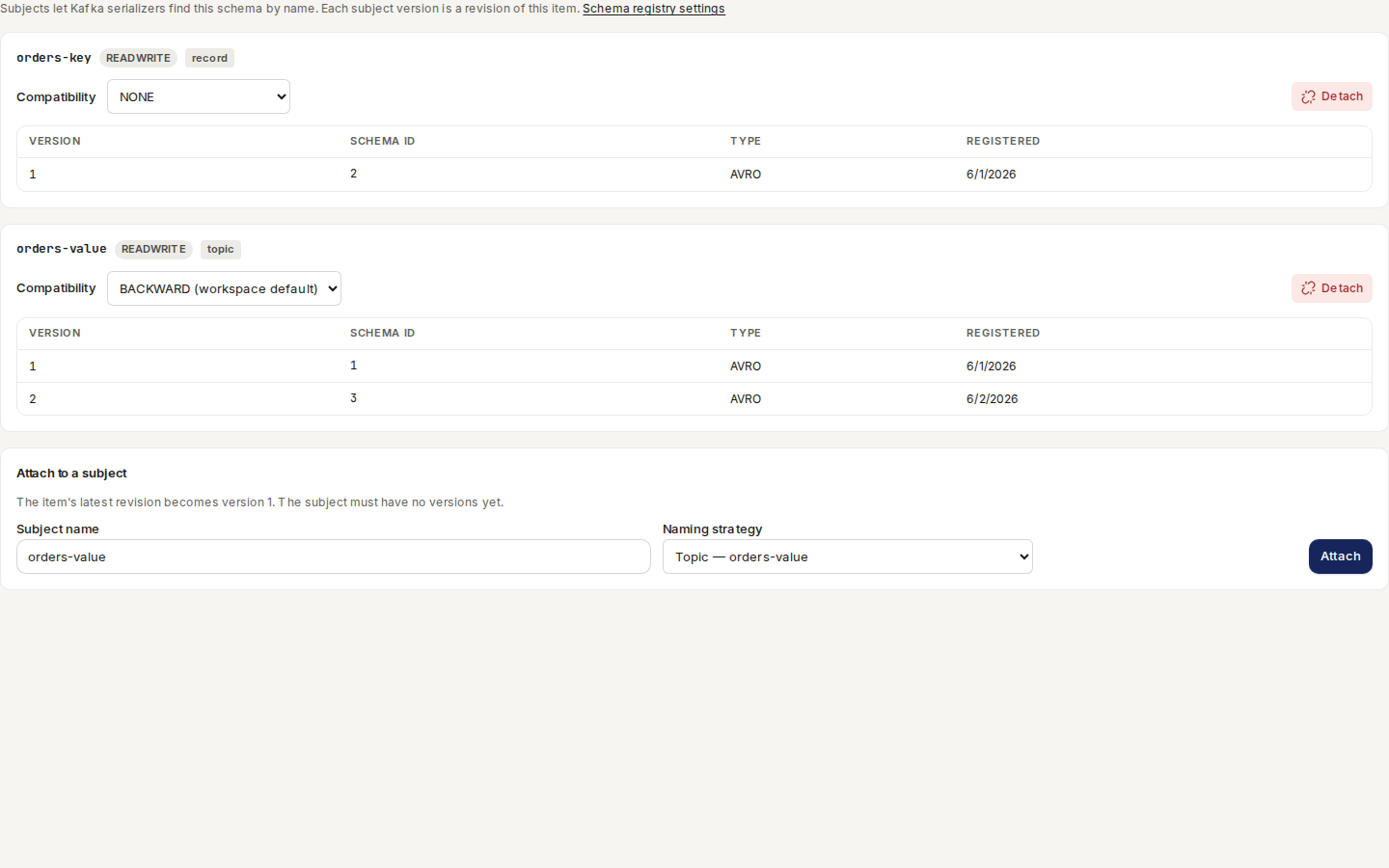
An Avro, JSON Schema or Protobuf item in the Catalog has a Subjects
tab: open the item and click “Subjects” (or add ?tab=subjects to its address). It lists
every subject the item backs:
- the subject's name, mode and naming strategy;
- Compatibility — the subject's level, or the workspace default marked “(workspace default)”. Choose a level to change it; it is saved at once;
- the subject's versions, each with its schema ID, schema type and the day it was registered.
/ade/dashboard/catalogTo back a subject with this item:
- Under Attach to a subject, type the subject name — for example
orders-value. The field starts with the item's slug followed by-value. - Choose a Naming strategy — Topic, Record or Topic + record (see Subject naming strategies).
- Click “Attach”. The item's latest revision becomes version 1. The subject must have no versions yet; you need the Imports — edit permission.
To detach a subject, click “Detach” on it, then “Detach” again to confirm. Detaching deletes the subject and its versions (a soft delete, as on the API), but the catalog item and its revisions stay, and its schema ids keep resolving. You need the Imports — delete permission.
Items that back a subject also carry a Registry chip in the Catalog list.
Registry settings
Route/ade/dashboard/schema-registry
Open Workspace → Schema registry. The page has three sections.
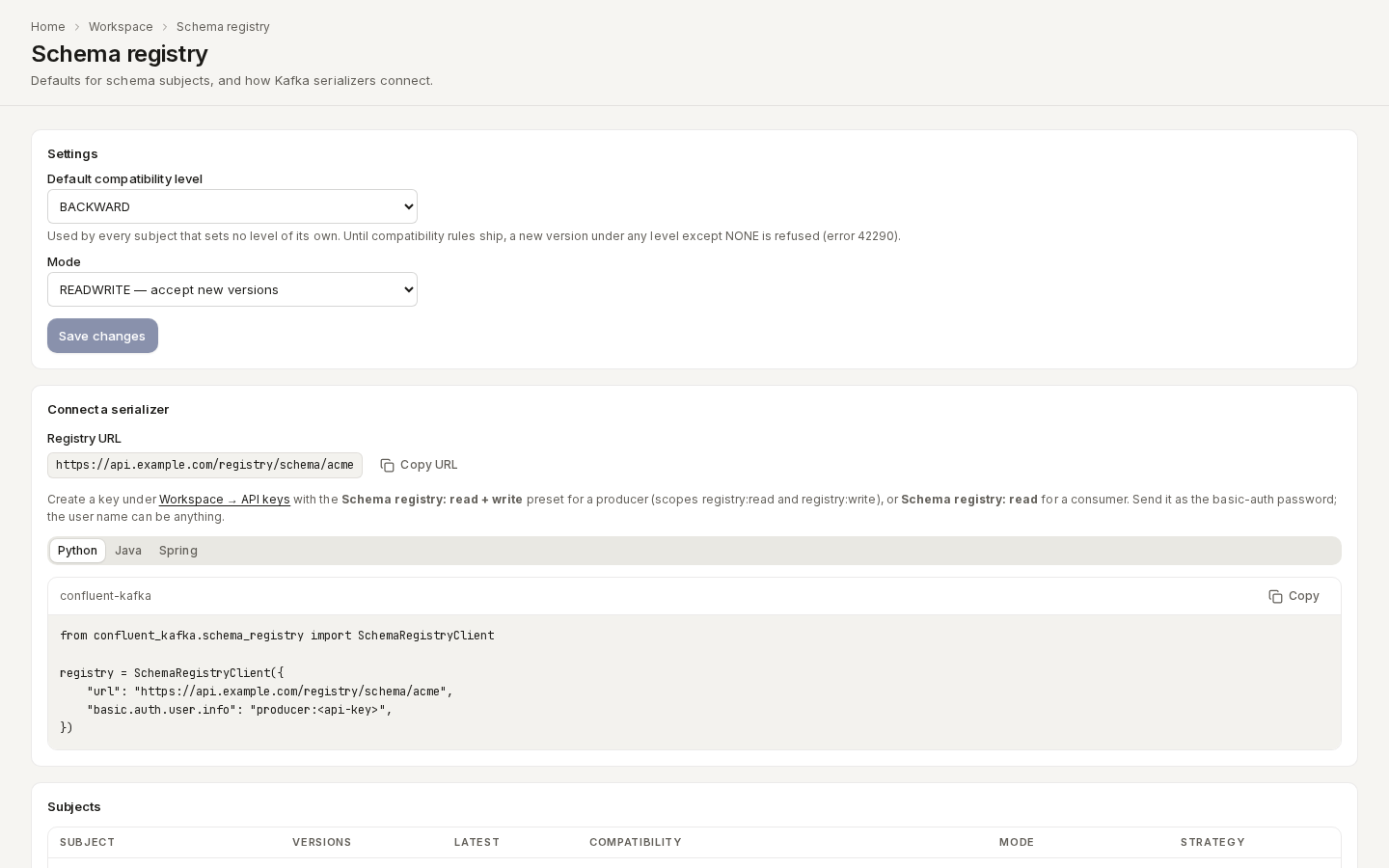
/ade/dashboard/schema-registrySettings — the workspace defaults:
- Choose a Default compatibility level. Every subject without a level of its own uses it.
- Choose a Mode — READWRITE accepts new versions; READONLY refuses every new version in every subject.
- Click “Save changes”. You need the Imports — edit permission.
Connect a serializer — your workspace's Registry URL (“Copy URL” copies it), which
API key to create (Schema registry: read + write for a producer, Schema registry: read for
a consumer), and configuration for Python (confluent-kafka), Java
(kafka-avro-serializer) and Spring (Spring Kafka). Click a language, then click
“Copy”, and replace <api-key> with your key — the page never shows a key.
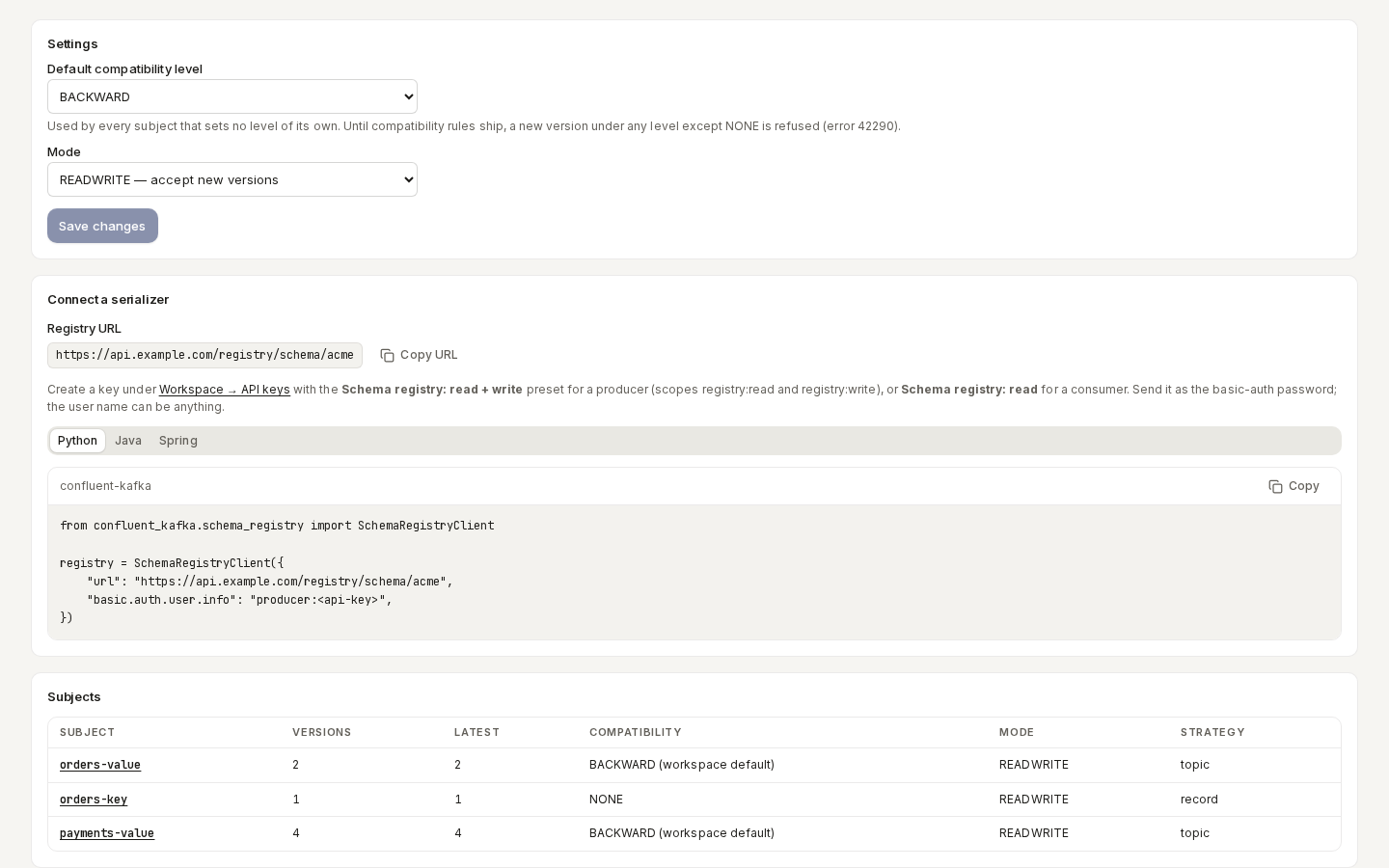
Subjects — every live subject with its version count, latest version, compatibility level, mode and strategy. Click a subject name to open its catalog item's Subjects tab.
/ade/dashboard/schema-registryFrom the command line
apiome registry works with the same subjects (see the registry reference):
| Command | Does |
|---|---|
apiome registry subjects | Lists the workspace's subjects |
apiome registry versions orders-value | Lists a subject's versions; --version latest (or a number) prints one with its schema |
apiome registry register orders-value order.avsc | Registers a schema; the type comes from the extension (.avsc, .json, .proto) or --type |
apiome registry compat orders-value order.avsc | Tests a schema without registering it; exits 1 when it is not compatible |
apiome registry config | Prints the workspace defaults; --level and --mode change them |
apiome registry config orders-value --level NONE | Prints or changes one subject's level, mode or --strategy |
compat follows the compatibility rule: under any level except NONE
it fails with error 42290 and exit code 2, and both register and compat then suggest
apiome registry config <subject> --level NONE.
Subject naming strategies
The strategy records how a subject name is built — the same three strategies the Avro export uses for its subject names:
| Strategy | Subject name | Example |
|---|---|---|
topic | <topic>-value (or -key) | orders-value |
record | <namespace.Record>-value | acme.Order-value |
topic_record | <topic>-<namespace.Record>-value | orders-acme.Order-value |
Register a schema with the Apiome API
Besides the Confluent API, the Apiome API under /v1/tenants/<tenant>/schema-registry shows each
version's catalog item and revision. It follows the same compatibility rule.
Send the schema text to the subject's versions. schemaType is AVRO (the default), JSON or
PROTOBUF:
curl -X POST https://<your-apiome-host>/v1/tenants/acme/schema-registry/subjects/orders-value/versions \
  -H "X-API-Key: <workspace-api-key>" -H "Content-Type: application/json" \
  -d '{"schemaType": "AVRO", "strategy": "topic",
       "schema": "{\"type\":\"record\",\"name\":\"Order\",\"namespace\":\"acme\",\"fields\":[{\"name\":\"id\",\"type\":\"string\"}]}"}'
The answer names the schema id, the subject version, whether it was created, and the catalog
item (projectId) and revision (versionRecordId) that hold it. You need the Imports — create
permission.
Attach an existing catalog item
An Avro, JSON Schema or Protobuf item you already imported can back a subject. Its latest revision becomes version 1; its earlier revisions stay exactly as they are, and later registrations under the subject add revisions to the same item:
curl -X POST https://<your-apiome-host>/v1/tenants/acme/schema-registry/subjects/orders-value/attach \
  -H "X-API-Key: <workspace-api-key>" -H "Content-Type: application/json" \
  -d '{"projectId": "<catalog-item-id>"}'
The subject must have no versions yet. You need the Imports — edit permission.
Mirror an existing registry
Already run Confluent Schema Registry, Karapace or Apicurio? Add a
schema registry connector and Apiome mirrors every
subject on a schedule: each upstream version becomes a version here and a revision of a catalog
item, and the upstream compatibility level is copied. A mirrored subject has a sourceRef of
registry:<registry URL>, and its versions keep their upstreamVersion and upstreamSchemaId. The
connector never takes over a subject that already exists in your workspace, and never writes to the
upstream registry.
Read, change and delete subjects
| Route | Does |
|---|---|
GET …/schema-registry/subjects | Lists live subjects with their version count and latest version |
PUT …/subjects/<subject> | Creates a subject or changes its strategy, compatibilityLevel or mode |
GET …/subjects/<subject>/versions | Lists a subject's versions, oldest first |
GET …/subjects/<subject>/versions/<n> | One version with its schema text (latest works too) |
DELETE …/subjects/<subject> | Deletes a subject and its versions |
GET …/schema-registry/schemas/ids/<id> | Resolves a schema id to its schema text |
GET / PUT …/schema-registry/config | The tenant's default compatibility level and mode |
Deleting a subject hides it and its versions from every list, but its schema ids keep resolving, so a consumer that already holds an id can still read the schema. The catalog item and its revisions are not deleted. You can register a deleted subject's name again; it starts at version 1.
Reference
- Schema registry REST reference
- Catalog — where subject versions live as catalog item revisions
- Connectors — mirror subjects from an existing registry
- Export a spec — exporting to Avro and other formats