Mock try-out
There are three ways to see what a mock answers before a consumer depends on it, from lightest to heaviest:
| Way | Where | Needs a running mock |
|---|---|---|
| Try it — render one request without sending it | The Scenarios and Correlation editors | No |
| Hosted mock — call the version's mock URL | The Mock cell on Published or Versions | Yes, turned on |
| Mock server test drive — a short-lived mock of a file you just exported | Export studio, Review & Generate | Started for you, for 30 minutes |
Preview a response (Try it)
Route/ade/dashboard/published
- On Published, click “Scenarios” (or “Correlation”) in a version's Mock cell.
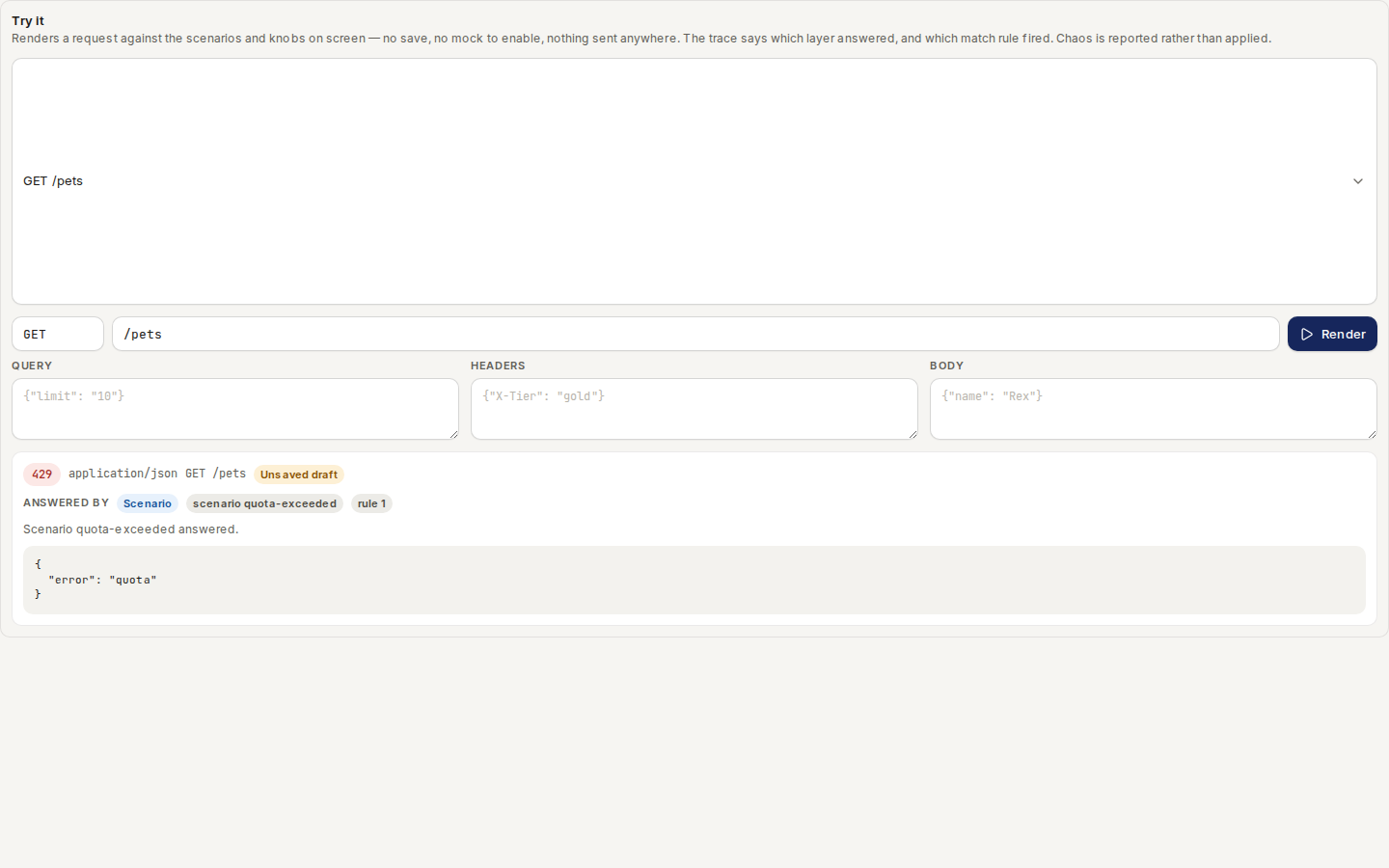
- Under Try it, choose an operation —
GET /pets— and fill in any parameters. - Click “Render”. You see the status, headers and body the mock would return, and a trace naming the layer that answered — a scenario and its rule, correlation or the spec's example.
Nothing is saved and nothing is sent: the preview uses the editor's unsaved draft, so you can try a change before Save scenarios. Latency and chaos are reported rather than applied. Details are in Mock response preview.
/ade/dashboard/publishedCall the hosted mock
Turn on the version's mock on Published, copy its URL and
call it. Send X-Mock-Scenario: <name> to pick a scenario:
curl https://mock.apiome.dev/acme/payments-api/2.3.1/payments
curl -H 'X-Mock-Scenario: quota-exceeded' https://mock.apiome.dev/acme/payments-api/2.3.1/payments
The Mock cell's sparkline counts the requests over 30 days.
Test-drive an export
Route/ade/dashboard/export/studio
After you generate an OpenAPI file in the Export studio, the Review & Generate step offers Mock server test drive — proof that the file behaves like an API, not just that it parses.
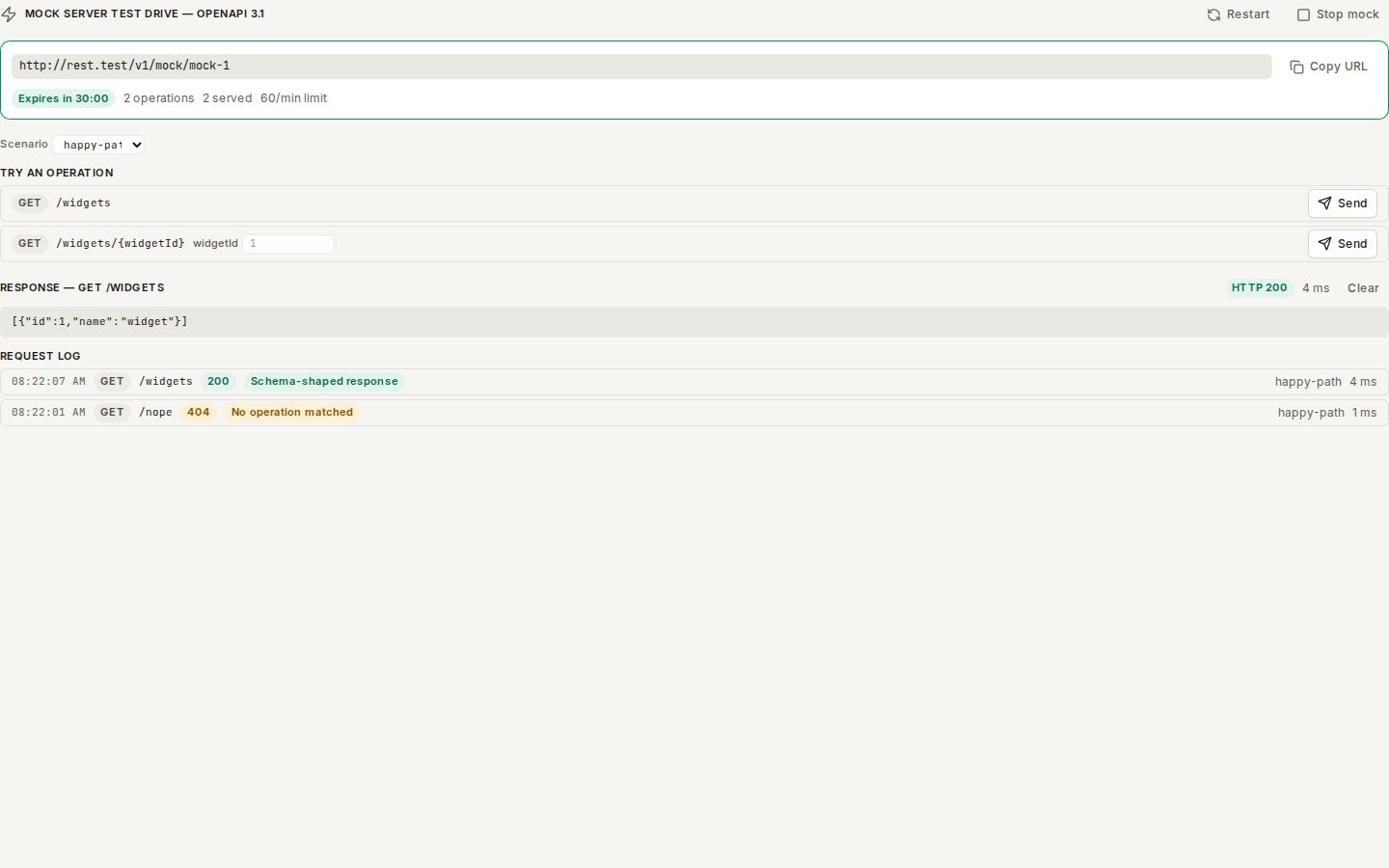
/ade/dashboard/export/studio- Click “Start mock”. The file is served as a live API for 30 minutes (the server default). Its base URL appears with “Copy URL”, a countdown — Expires in 30:00 — how many operations it has and how many requests it has served.
- Under Try an operation, choose a Scenario if the file declares any, fill in path
parameters (for example
1for{widgetId}) and click “Send”. The response shows its status, time and body; a body that does not match the file's own response schema is called out. - The Request log states each request's outcome in words: Schema-shaped response,
Matched, Body did not match the schema or No operation matched. Requests you send from
your own client with
curlappear here too. - “Restart” gives you a fresh mock; “Stop mock” ends it early. When time is up the panel says Expired — start another to keep testing.
The panel is hidden for targets the mock engine cannot serve, and Start mock is disabled, with the reason, on a server without mock infrastructure.
With the CLI or the API
- CLI:
apiome mock preview <project> <version> -X GET --path /pets/42renders a request like Try it;apiome mock run BUNDLEserves a version offline — see Portable mock runtime. - REST:
POST /v1/versions/{tenant}/{project_id}/{version_record_id}/mock/preview(Try it);POST /v1/export/{tenant}/mock,GET /v1/export/{tenant}/mock/{mock_id}/requestsandDELETE /v1/export/{tenant}/mock/{mock_id}(test drive) — see the API reference.
Where next
The Mock runtime guides cover the bundle format, fixture packs, callbacks, correlation, proxy capture and attestation.