Shadow APIs
/ade/dashboard/connectors/shadow
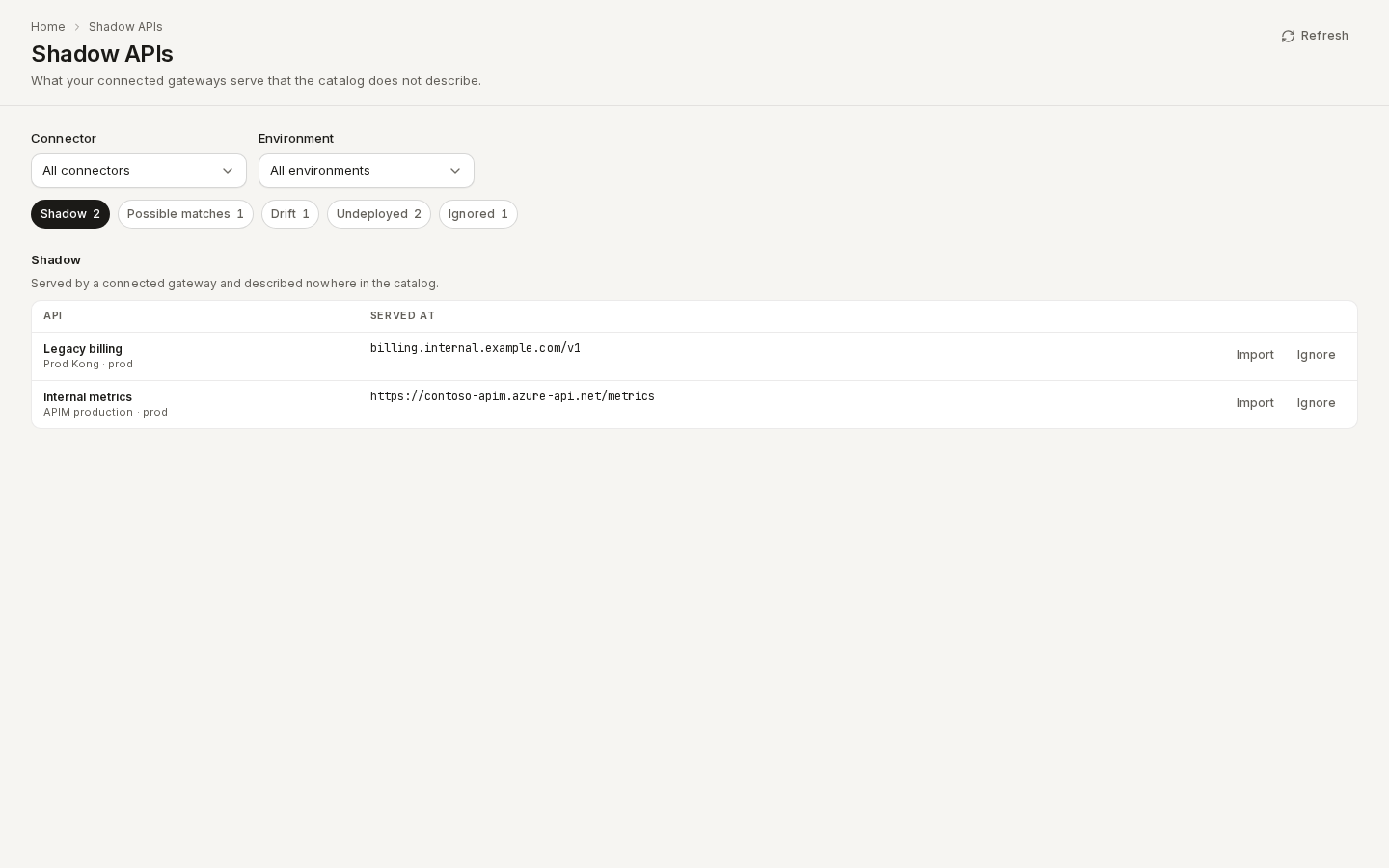
Shadow APIs compares what your connected gateways serve with what the catalog describes. A gateway API that nobody has described is a shadow API: it runs, but nobody can find it, review it or govern it. Go to Govern → Shadow APIs.
The report is built from the inventory of your connectors (Kong, AWS API Gateway, Azure API Management). Register and sync a connector first. MCP registry and schema registry connectors are not part of it: they list MCP servers and schema subjects, not APIs a gateway serves.
/ade/dashboard/connectors/shadowThe sections
Pick a section with the chips under the filters. Each chip shows how many rows it has.
| Section | What it lists |
|---|---|
| Shadow | APIs a gateway serves that match nothing in the catalog |
| Possible matches | APIs a gateway serves that look like a catalog item or a published Project. Each shows the item, how it matched and a confidence. |
| Drift | APIs linked to a catalog item whose deployed revision the catalog does not have |
| Undeployed | Catalog items and published Projects that declare an HTTP server, but that no connected gateway serves |
| Ignored | APIs someone ignored, with their reason |
Use Connector and Environment to narrow the report to one connector or one environment.
How a possible match is found
Apiome tries three ways to match a gateway API, strongest first:
| Match | Confidence | When |
|---|---|---|
| Same remote id | 100% | A catalog revision was imported from this gateway API before (it has since been unlinked) |
| Same host | 90%, or 70% for the host alone | The API is served on a host and base path that a catalog item or Project declares as a server |
| Similar name | up to 50% | The API's name is at least 80% similar to a catalog item's or Project's name |
Nothing is linked automatically. A possible match is only a suggestion until you link it.
Act on a row
| Action | What it does |
|---|---|
| Link to item (possible matches) | Opens a dialog with the suggested item and any other candidates. Choose the item it really is and click Link to item. The API is then treated as cataloged, and drift is measured from now. |
| Import | Imports this one API into the catalog now, as a catalog item. Use it for a shadow API you want described, or to catch up on drift. |
| Ignore | Asks for a Reason, then removes the API from Shadow and Possible matches. It is never imported by a sync. |
| Stop ignoring (Ignored) | Returns the API to its section and clears the reason. |
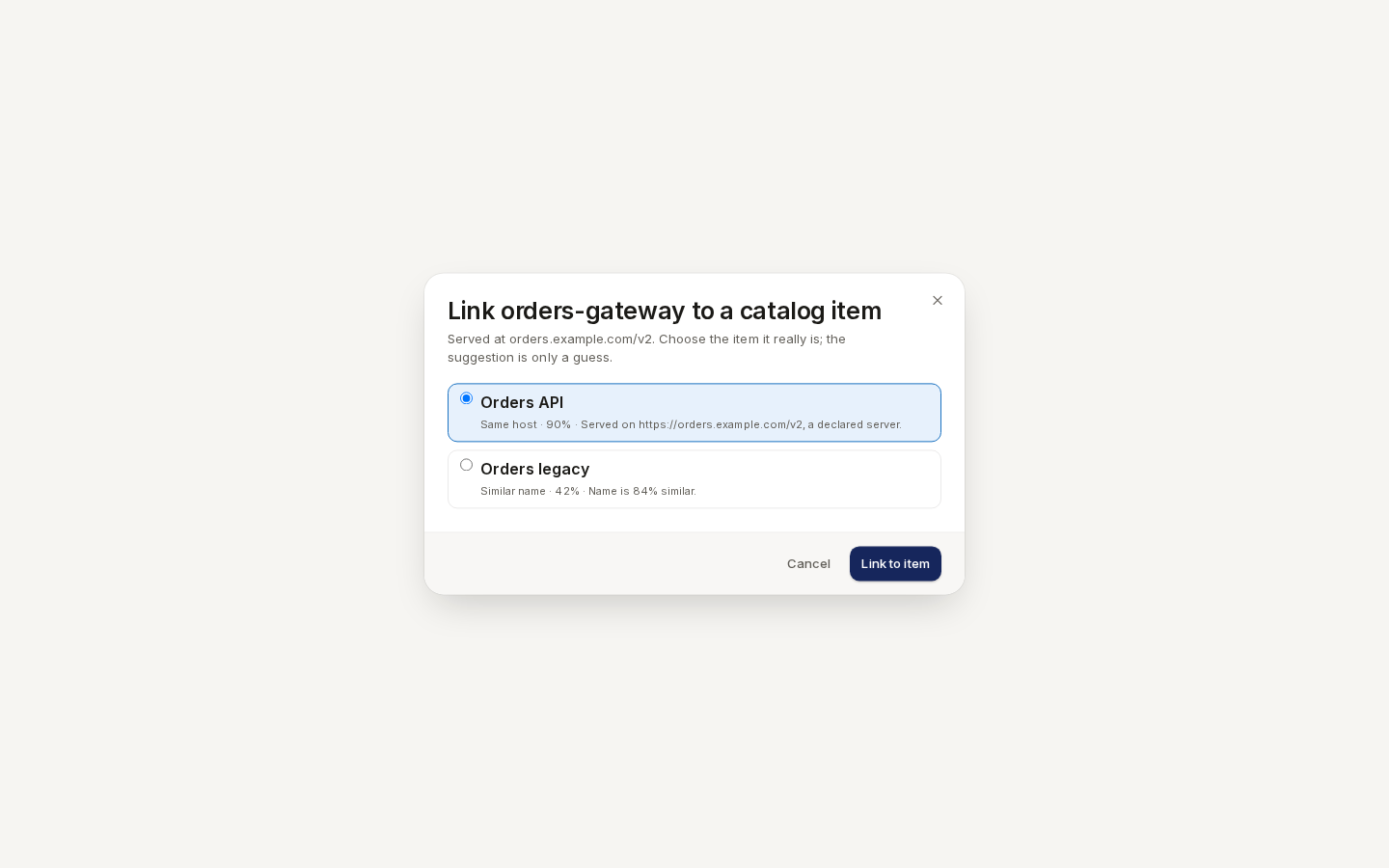
/ade/dashboard/connectors/shadowAn ignored API comes back when its gateway starts serving it on another host or base path, because what you judged is no longer what runs. It reappears in Shadow (or Possible matches) with your earlier reason beside it.
When an inventory is stale
If a connector's last sync failed, the report shows Inventory stale since with the time of its last successful sync. Its rows come from that older inventory, so an empty section is not a clean result. Fix the connector (its runs show the error), sync it, then click Refresh.
Notifications
When a sync finds an API it has never seen before and that matches nothing in the catalog, Apiome
sends a catalog.connector.shadow_api_detected event to your workspace's webhook channels. A Slack
incoming webhook gets a Slack message. At most one event is sent per connector per hour. The event
links to this page, filtered to the connector.
In CI
apiome connectors shadow-report prints the same report. With --fail-on, it fails a pipeline
when a category you name has rows:
apiome connectors shadow-report --format table --fail-on shadow,drift
It exits 6 only when one of the named categories (shadow, possible-matches, undeployed,
drift) has a row, and 0 otherwise. A stale inventory is printed as a warning. See
apiome connectors and Exit codes.
API
| Method and path | What it does |
|---|---|
GET /v1/tenants/{tenant}/shadow-report?connector=&environment= | The report |
POST …/connectors/{id}/items/{itemId}/link | Link a row: {"catalogItemId": "…"} |
POST …/connectors/{id}/items/{itemId}/ignore | Ignore a row: {"reason": "…"} |
POST …/connectors/{id}/items/{itemId}/unignore | Stop ignoring a row |
POST …/connectors/{id}/items/{itemId}/import | Import a row now; returns the run |
Reading the report needs the Imports: View permission; the actions need Imports: Edit.
Related
- Connectors: register and sync the gateways the report reads.
- Catalog: where imported and linked APIs live.