Dependency graph
The dependency graph records how the things in your workspace relate: which consumers depend on which fields of an API, which catalog item a Project was converted from, which gateway serves an API, which repository a draft lives in. Each relationship is an edge between two nodes.
You see it in three places: the Dependency graph page, a Dependencies tab on every project, catalog item and MCP server, and the Blast radius drawer. The REST API reads the same edges (see Reading edges).
The Dependency graph page
Route/ade/dashboard/graph
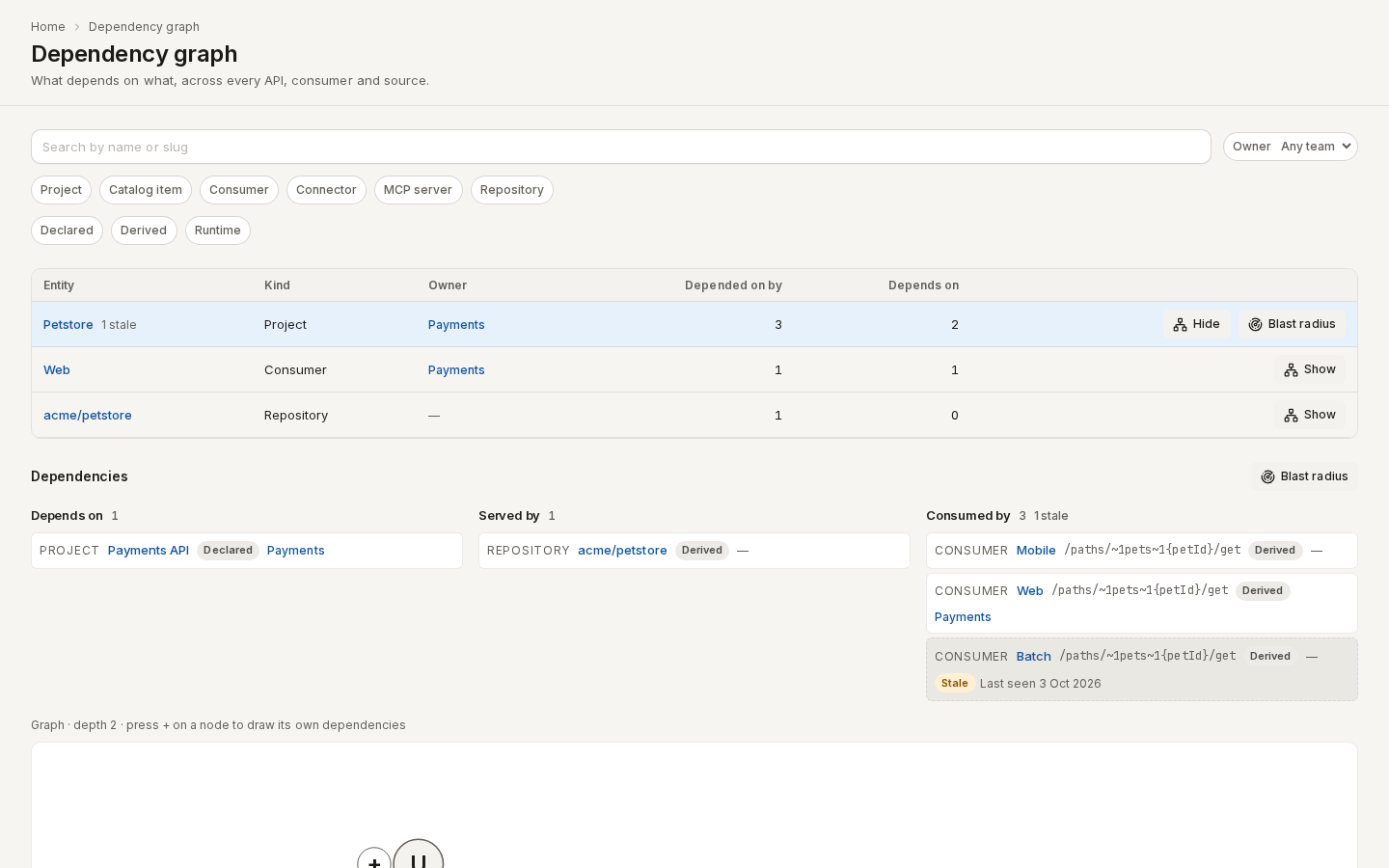
Go to Govern → Dependency graph. It lists every entity that has at least one edge, most connected first, with its owner team and two counts: Depended on by (edges pointing at it) and Depends on (edges leaving it). An entity with stale edges says how many.
- Search by name or slug.
- Narrow the list with the kind chips (Project, Catalog item, Consumer, Connector, MCP server, Repository), the Owner team, and the provenance chips (Declared, Derived, Runtime).
- Click “Show” on a row to open its dependencies below the list. The address changes to
?entity=<kind>:<id>, so you can send it to a teammate. - Click “Blast radius” on a project or catalog item to open the Blast radius drawer.
The page shows at most 2,000 entities. When more match, it says Showing 2,000 of N; search or filter to see the rest.
/ade/dashboard/graphThe Dependencies tab
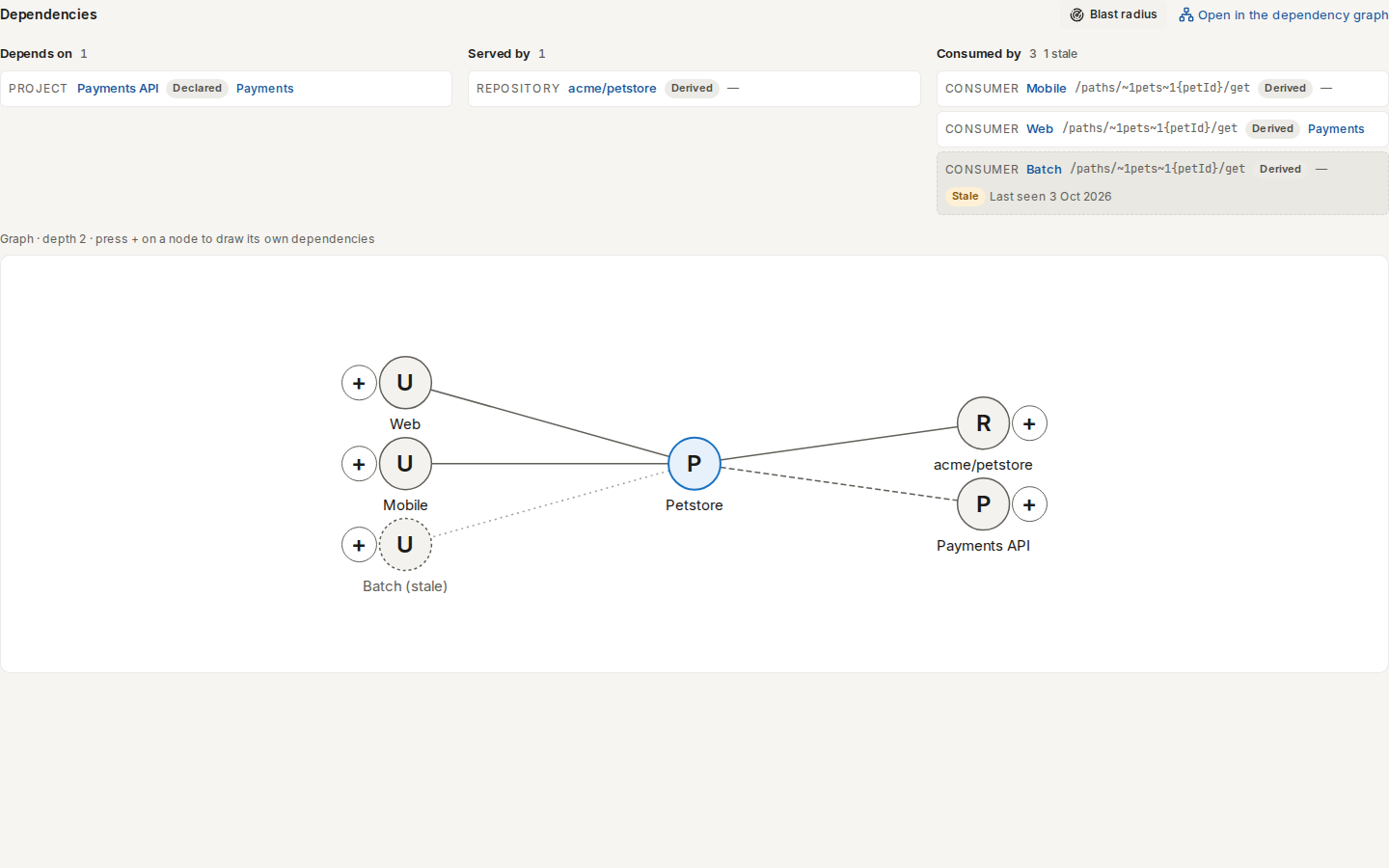
Every project (Build → Projects, the project's versions page), catalog item and MCP server has a Dependencies tab. It shows a list first, then a drawing:
- The list groups the entity's edges by direction and kind (Depends on, Consumed by, Served by and so on). Each row names the other end (a link to its page), the pointer when there is one, the provenance (Declared, Derived or Runtime) and the other end's owner team. A Stale edge is dimmed and says when it was Last seen.
- The drawing puts the entity in the middle, what depends on it to the left and what it depends on to the right. A letter in each node says its kind (P project, C catalog item, U consumer, R repository…), and a dashed node or line is stale. Press + beside a node to draw its own dependencies one step further out. Every node is a link. A column shows at most ten nodes and says how many more are in the list.
“Open in the dependency graph” opens the same entity on the Dependency graph page.
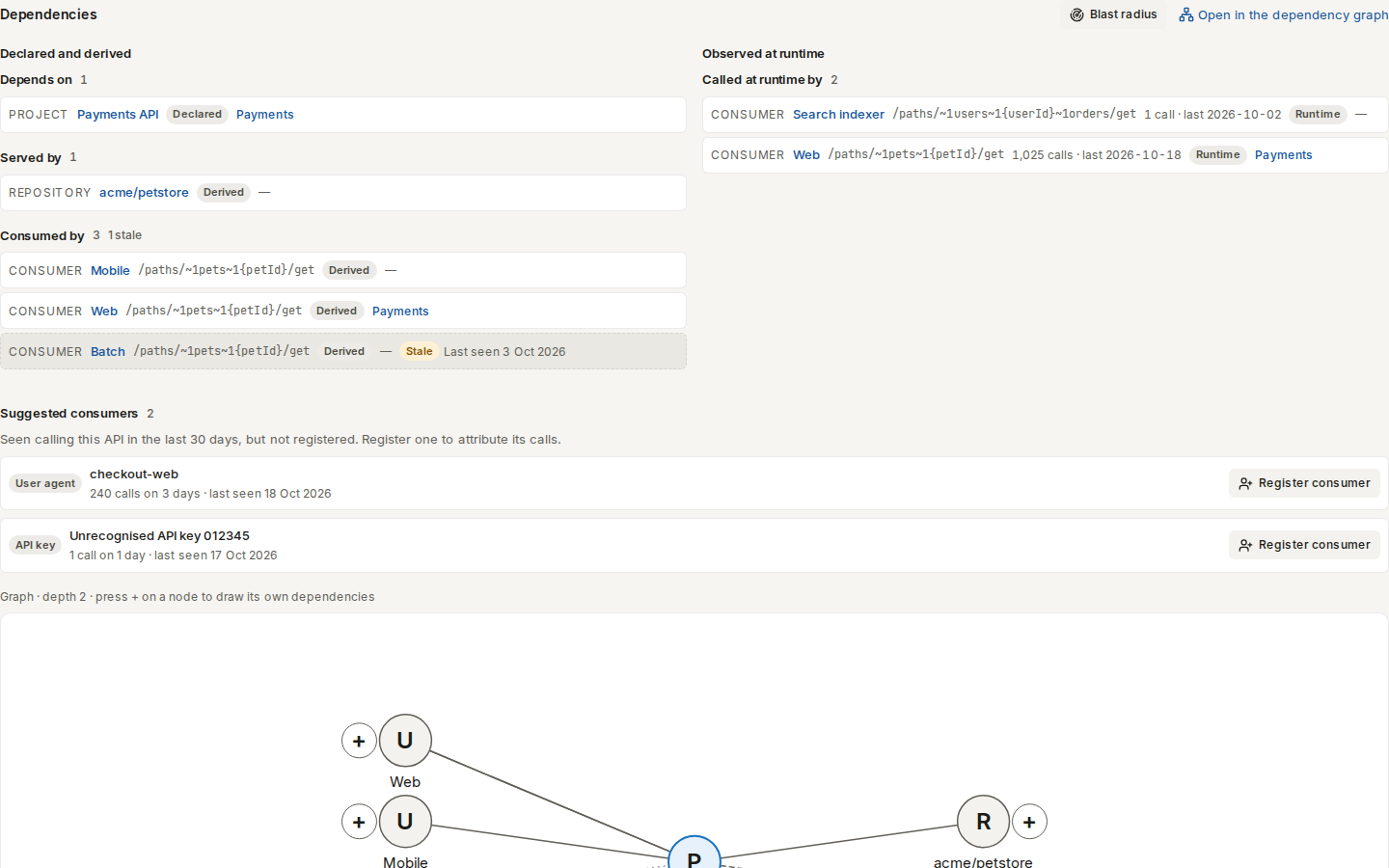
When the entity has runtime edges, the list splits into two columns: Declared and derived on one side and Observed at runtime on the other. A runtime row also shows its call count and the last day it was seen. A project or catalog item then lists its suggested consumers.
/ade/dashboard/catalogEdges
An edge goes from one node to another and has a kind:
| Edge kind | From → to | Where it comes from |
|---|---|---|
consumes | consumer → Project or catalog item | The consumer's current contract. One edge per field or operation the contract declares, carrying that JSON Pointer. |
converted_from | Project → catalog item | Converting a catalog item into a Project |
identity_of | Project or catalog item → identity group | Linking APIs that are the same API in different formats |
built_from | MCP endpoint → MCP source | Linking a source artifact to an MCP endpoint |
deployed_on | Project or catalog item → gateway config | A connector sync that found the API in a gateway environment — see Environments |
served_by | Project or catalog item → repository | A repository import, or a draft bound to a repository branch |
depends_on | Project or catalog item → what it depends on | A declared dependency. A Backstage consumesApis entry is a declared consumes edge. |
runtime_calls | consumer → Project or catalog item | Calls the usage index attributed to the consumer. One edge per operation it called. See Runtime edges. |
Node kinds are project, catalog_item, consumer, connector, mcp_endpoint, mcp_source,
repository, identity_group and gateway_config (one per connector environment). A Project that is not yet publishable is a catalog_item.
Provenance
Every edge says how Apiome knows about it:
| Provenance | Meaning |
|---|---|
derived | Apiome worked it out from records it already has: contracts, conversions, links, syncs. Every edge kind above except depends_on is derived. |
declared | Someone stated it: through the API, in the spec itself, or in a Backstage file. See Declare dependencies. |
runtime | Seen in traffic: runtime_calls edges, from the usage index. See Runtime edges. |
The same two nodes can be joined by edges of different provenance. Each edge also names the record
it came from (source_ref, such as consumer_contract:<id>).
How edges appear and go stale
Edges follow their records:
- When the record changes. Saving a consumer contract, converting an item, binding a draft or removing a repository updates that kind of edge in the same save. Identity links, MCP sources and connector syncs update their edges right after they finish.
- Every night. A repair pass re-derives every edge kind for every workspace. It catches anything a save missed.
When the record behind an edge goes away (a consumer is retired, a contract revision drops a field,
a source is retired), the edge is not deleted at once. It becomes stale: it keeps the time
it was last seen and is reported with stale: true. Stale edges are removed after 30 days. If
the record comes back first, the edge is current again.
Re-deriving is safe to repeat: running it again over the same records leaves the same edges.
Declared edges don't go stale. They change only when their source does: see Declare dependencies.
Consumers and impact
A consumer's consumes edges are exactly the pointers its current contract declares. The consumers
that a change to an API can affect are the ones with a current consumes edge whose pointer
overlaps a changed pointer, the same set the consumer impact check reports when a version is compared or published.
To see those consumers together with what depends on them in turn, their owner teams and the
evidence the change invalidates, run the blast radius, or add --blast-radius to
the diff gate (In the diff gate and the PR comment).
Runtime edges
A contract says what a consumer declares it uses. Live traffic says what it calls. Once a
binding recognises a consumer's calls, Apiome
draws a runtime_calls edge from the consumer to the API for each operation it called:
| Field | Value |
|---|---|
pointer | The operation, for example /paths/~1pets~1{petId}/get |
provenance | runtime |
source_ref | usage:30d: the edge summarises the last 30 days of calls |
evidence | calls, errors, last_seen_day (the newest UTC day with a call), window_days and via (the binding kinds that recognised the calls: header, api_key, jwt_claim, user_agent) |
Runtime edges sit beside the declared and derived ones and are never merged into them. A
consumer that declares GET /pets/{petId} and also calls it has both a consumes edge and a
runtime_calls edge for it. An operation it calls without declaring has only the runtime edge, which
is how a dependency nobody wrote down shows up.
How runtime edges appear and go stale. The usage sweep (hourly by default) rolls up the day's calls and then re-derives every workspace's runtime edges. A call therefore shows up as an edge after the next sweep. When an operation has had no attributed call for 30 days, its edge becomes stale, and it is removed 30 days after that, like any other stale edge. Calls that no binding recognises draw no edge, because there is no consumer to draw it from. They appear as suggested consumers instead.
/ade/dashboard/catalogSuggested consumers
A suggested consumer is a client seen calling the API in the last 30 days that no binding recognises. A project's or catalog item's Dependencies tab lists them under Suggested consumers, busiest first:
- a User agent client is named by the first word of its user agent (
checkout-webfromcheckout-web/4.2); - a Header, API key or JWT claim client is one whose hashed value arrived in the usage
event's
consumer_hintwithout matching a binding. It reads Unrecognised API key plus a short tag. Apiome never had the value, and never shows its hash either.
To register one:
- On the Dependencies tab, click “Register consumer” next to the suggestion.
- Check the Name and Handle. Change them if you like.
- For a header, API key or JWT claim client, enter the Header or claim name its value arrives in,
for example
x-api-key. - Click “Register consumer”.
Apiome registers the consumer and adds the binding that recognises it: the pattern checkout-web/*
for a user agent, or the hashed value Apiome already received for the others, so you never type the
value. From the next batch on, its calls are attributed, and its runtime edges appear after the
next sweep. Registering needs consumer_contracts:create.
With the API, GET /v1/tenants/{t}/projects/{p}/consumer-suggestions lists the suggestions, and
POST …/consumer-suggestions/{id}/register registers one. The body takes name, slug,
binding_name (for a hashed client) or consumer, the handle of an existing consumer to bind the
client to instead of registering a new one.
Declare dependencies
A consumer contract says what a registered client uses. A service can also say what it depends on: "this API calls the payments API and uses the customer schema". Apiome reads that from three places. Each one keeps its own list:
| Where | source_ref | Edge |
|---|---|---|
The REST API or apiome graph declare | manual | depends_on |
x-apiome-depends-on in the spec you import | spec | depends_on |
A Backstage catalog-info.yaml in the API's repository (details) | backstage:<path> | consumes or depends_on |
Each source replaces its own list every time: importing the spec again, scanning the repository again or sending the same list again never adds duplicates, and removing an entry removes its edge. One source never changes another's list.
A reference that names nothing is kept, not dropped. It is listed under unresolved with the
reason not-found (or self, when an API names itself), so a typo or an API that is not in the
catalog yet stays visible.
In the spec: x-apiome-depends-on
List what the API depends on at the root of the document. Each entry is
<slug>[#<pointer>]: the slug of a project or catalog item, optionally followed by # and a JSON
pointer into it.
openapi: 3.1.0
info:
  title: Orders
  version: 1.0.0
x-apiome-depends-on:
  - payments
  - customers#/components/schemas/Customer
| Format | Where to put it |
|---|---|
| OpenAPI, AsyncAPI | A root property, as above |
JSON Schema, Avro (.avsc) | A top-level property of the schema |
| GraphQL | A line x-apiome-depends-on: payments, customers#/types/Customer in a description, usually the schema block's |
The value can also be one string, or a comma-separated string. At most 200 entries are read.
"""
x-apiome-depends-on: payments, customers#/types/Customer
"""
schema { query: Query }
Avro IDL has no root to extend, so it can't declare dependencies.
Through the API or the CLI
PUT /v1/graph/{tenant}/entities/{kind}/{entity}/dependencies
X-API-Key: <your-api-key>

{
  "dependencies": [
    { "to": { "slug": "payments" }, "note": "card capture" },
    { "to": { "kind": "project", "id": "<project-id>" }, "pointer": "/components/schemas/Customer" }
  ]
}
tonames the target: a project or catalog item byslug, or any entity bykindandid.pointer(optional) is a JSON pointer into the target.note(optional) is up to 500 characters.- The list replaces the entity's
manualdependencies. Send[]to clear them. {entity}is the entity's id, or a project or catalog item's slug.- Reading needs the kind's
viewpermission, changing it needsedit. Changes are audited asgraph.dependencies.update.
GET on the same path lists every declared dependency the entity has, from all three sources, and
its unresolved references.
From the command line, apiome graph declare sends the same list and
apiome graph dependencies lists it:
apiome graph declare project orders --depends-on payments --depends-on customers#/components/schemas/Customer
apiome graph dependencies project orders
Blast radius
Before you change an operation or a schema, ask what the change affects: who depends on it, and which evidence you would have to produce again.
The Blast radius drawer
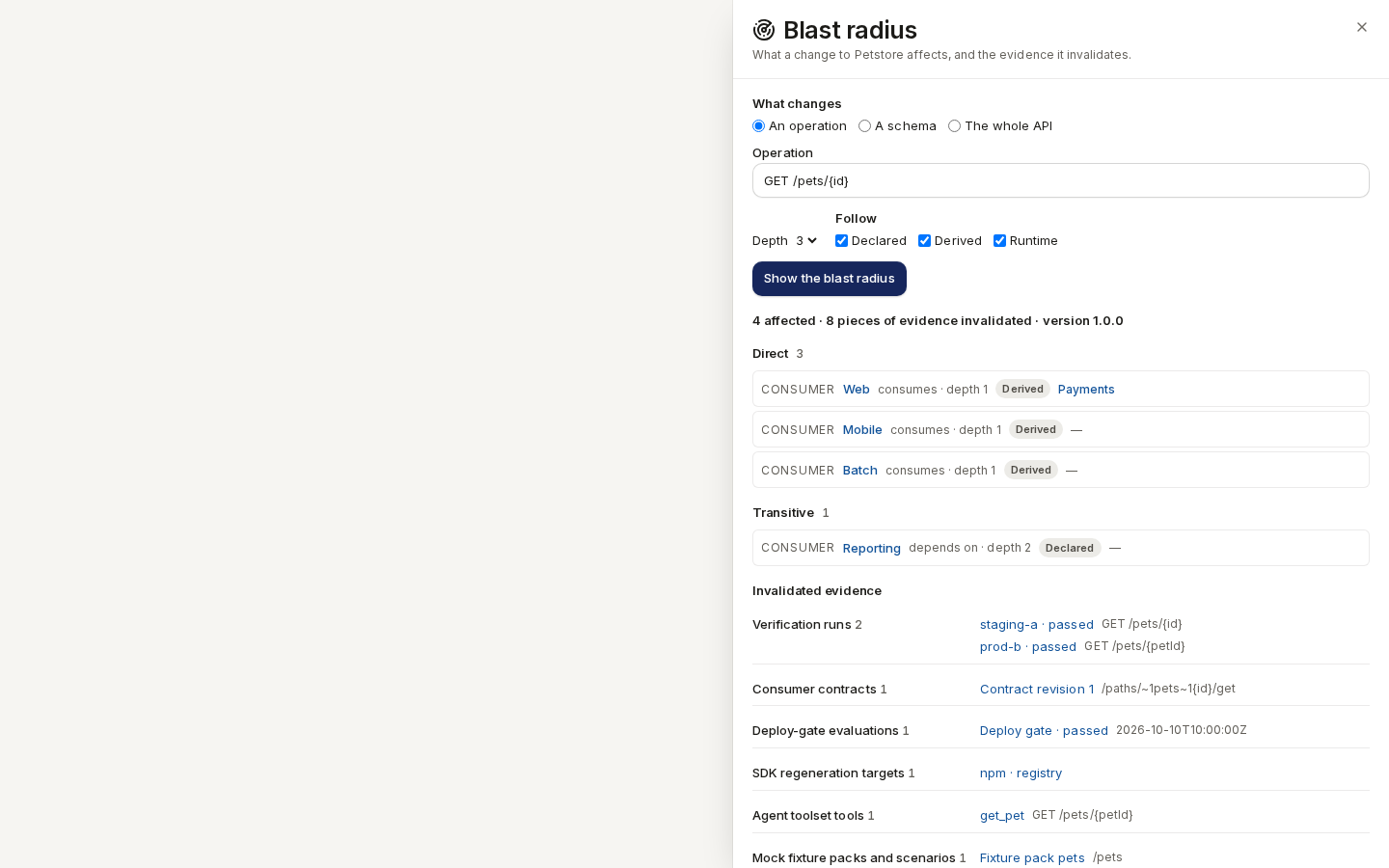
Click “Blast radius” on a project or catalog item's Dependencies tab, or on its row of the Dependency graph page.
- Under What changes, pick An operation, A schema or The whole API.
- Type the operation (for example
GET /pets/{id}) or the schema name (for examplePet). - Choose the Depth (1–5) and which edges to Follow.
- Click “Show the blast radius”.
The drawer lists the Direct and Transitive dependents, each with its owner team, and every kind of Invalidated evidence with links to where it lives. When nothing is affected it says Nothing depends on this change, and no evidence is invalidated. When the answer is cut short at 2,000 entities it says how many it found.
/ade/dashboard/graphFrom the API or the CLI
apiome graph impact --project petstore --operation "GET /pets/{id}"
apiome graph impact --project petstore --schema Pet --format json
POST /v1/graph/{tenant}/blast-radius
X-API-Key: <your-api-key>

{
  "entity": { "kind": "project", "id": "petstore" },
  "pointers": ["/paths/~1pets~1{id}/get"],
  "depth": 3
}
| Field | Meaning |
|---|---|
entity | What changes: a kind and its id (a project or catalog item may be named by slug) |
pointers | JSON pointers into it that change, such as /paths/~1pets~1{id}/get or /components/schemas/Pet. Leave it out and the whole entity changes. |
depth | How many levels of dependents to follow, 1–5. Default 3. |
provenance | Which edges to follow: declared, derived, runtime. Default all three. |
version | Which version's evidence to check, by label or id. Default: the latest published version, or the latest revision when none is published. |
On the command line, --operation "METHOD /path" and --schema <name> are turned into these
pointers for you. Path parameter names don't have to match: GET /pets/{id} finds consumers that
declared GET /pets/{petId}.
Who is affected
- Direct: what depends on the changed entity itself. A consumer counts when its current contract declares the operation or a field it reaches; this is the same set the consumer impact check reports for the change. A declared dependency counts when it names the whole entity or an overlapping pointer.
- Transitive: what depends on something already affected, level by level, up to
depth. For example, a service that declared it depends on one of the direct consumers.
Only dependency edges are followed: consumes, depends_on and runtime_calls. Each affected
entity comes with its path (the edges from it back to the change), its provenance and its owner
team. provenances lists every provenance that reached it, so a consumer that both declares and
calls the changed operation reports ["derived", "runtime"]. To see only who calls the operation
in live traffic, send provenance: ["runtime"]. The answer covers at most 2,000 entities. truncated: true says there is more, beyond
depth or that limit.
Invalidated evidence
For a project or catalog item, the answer also lists the evidence the change makes out of date, in the chosen version:
| Evidence | What is listed |
|---|---|
verification_runs | The latest provider verification run on each target that exercised an affected operation |
consumer_contracts | The current contract revisions whose pointers overlap the change |
deploy_gate_evaluations | Deploy-gate and publish evaluations that cited one of those runs |
sdk_regen_targets | The project's active SDK regeneration subscriptions, when the change affects anything else |
agent_toolset_tools | The version's agent-toolset tools for an affected operation |
mock_fixture_packs | Mock fixture packs whose collection path contains an affected operation's path, and mock scenarios for an affected operation |
sunset_consumers | Consumers whose current contract is pinned to a deprecated or sunset version (see the sunset timeline) and overlaps the change |
A schema pointer affects every operation of the version that reaches that schema through $refs.
operations in the answer lists the operations the change reaches (null means all of them).
Empty is an answer. evidence_checked: true with empty lists means Apiome looked and nothing is
affected. It does not mean the evidence wasn't checked.
In the diff gate and the PR comment
The contract gate states each breaking change's blast radius in one line, so a reviewer sees who is affected without opening Apiome:
affects 4 consumers across 2 teams (mobile, payments); 2 verification runs invalidated
- Consumers: the consumers among the change's direct and transitive dependents.
- Teams: those consumers' owner teams, named. A consumer without an owner counts toward the consumers, not the teams.
- Verification runs: the
verification_runsthe change invalidates.
The line is computed against the baseline project and version you diff against. A change nobody
depends on reads affects no registered consumers; no verification runs invalidated; a cut-short
answer says "at least". At most 50 breaking changes per diff are checked, and the output says how
many more were not.
- The diff-action PR comment shows it under each breaking change by default. Set the
blast-radiusinput tofalseto leave it out (see diff-action). - The CLI shows it with
apiome diff ./openapi.yaml --against petstore@latest --blast-radius, in the text,jsonandmdformats. - The API adds it with
"blastRadius": trueonPOST /v1/diff/{tenant}/classified. Each breaking change then carriesblastRadius(consumers,teams,verificationRuns,truncated,line), and the markdown gains aBlast radius:line under each breaking row.
It needs the projects:view permission. It never changes whether the gate passes: --fail-on
still grades the whole specification.
Reading edges
GET /v1/graph/{tenant}/entities/{kind}/{id}/edges
| Parameter | Meaning |
|---|---|
direction | out (edges from the entity, the default) or in (edges to it) |
kind | Only these edge kinds. Repeat it for several. |
provenance | Only these provenances. Repeat it for several. |
limit | 1–500, default 100 |
offset | Edges to skip, for the next page |
labels | true adds each end's name, slug and owner team (from_label, to_label) |
The response lists the edges, current ones first and stale ones last, with total (how many
match) and truncated (true when there are more than this page holds). It needs the
projects:view permission.
For example, to list the consumers of a Project:
GET /v1/graph/{tenant}/entities/project/{project-id}/edges?direction=in&kind=consumes
X-API-Key: <your-api-key>
To list every entity that has edges, as the Dependency graph page does:
GET /v1/graph/{tenant}/entities?q=pet&kind=project&team=payments&provenance=declared
X-API-Key: <your-api-key>
Each entity comes with its name, owner team and in_count, out_count and stale_count, most
connected first. limit is 1–2,000 (default 200); total says how many match and truncated
whether there are more.
Export the graph
Export the dependency graph to use it in other tools: as JSON for a script, or as a Graphviz DOT file to draw.
apiome graph export --out graph.json
apiome graph export --format dot --out graph.dot && dot -Tsvg graph.dot > graph.svg
apiome graph export --entity project:<project-id> --depth 2 --format dot
GET /v1/graph/{tenant}/export?format=dot&team=payments
X-API-Key: <your-api-key>
| Parameter | CLI | Meaning |
|---|---|---|
format | --format | json (default) or dot |
kind | --kind | Keep edges with at least one end of this node kind, such as consumer. Repeat it for several. |
team | --team | Keep edges with at least one end owned by this team |
provenance | --provenance | Keep edges of these provenances. Repeat it for several. |
stale | --no-stale | false drops stale edges; they are included by default |
entity | --entity | kind:id: export only the edges around this entity, in both directions |
depth | --depth | How many hops around entity to export, 1–5. Default 2. |
- JSON is one document,
apiome.graph.export/v1: thefiltersused,truncated,node_count,edge_count, every node (kind,id,name,slug,owner) and every edge (its ends,edge_kind,pointer,provenance,source_ref, timestamps andstale). - DOT draws each node as a box labelled with its name, kind and owner team, and each edge from the dependent to what it depends on, labelled with its kind and pointer. Declared edges are bold, runtime edges dotted, stale edges dashed and grey.
An export holds at most 10,000 edges, current edges first. When more match, the JSON says
truncated: true, the DOT file's first line says so, and the CLI prints a warning. Narrow the
export with kind, team or entity. The response is streamed and downloads as
<tenant>-graph.json or <tenant>-graph.dot. It needs the projects:view permission.
The full reference is on Graph.