Migrate from Backstage or Compass
Moving off Backstage or Atlassian Compass? Apiome reads both catalogs: Backstage catalog-info.yaml
files in your repositories, and a Compass export you upload in the
import wizard. Everything they describe arrives as a
suggestion with where it came from. Nothing becomes a team, a component or a confirmed owner
until you click. Each import has an import report listing what is waiting for you and every field
Apiome could not map.
Files recognized
| Source | How it arrives | What is read |
|---|---|---|
Backstage catalog-info.yaml or catalog-info.yml, at any depth | Every repository scan of a GitHub branch | Entities of kind Component, System, Domain, Group and API; other kinds are listed as unmapped |
An Atlassian Compass export (.json, up to 5 MB) | Import to catalog → Compass export | {"components": [...], "teams": [...]}, a GraphQL searchComponents response, or a plain list of components |
A branch has one Backstage report, rewritten by every scan. Each Compass upload has its own report.
A minimal Compass export to try:
{
  "components": [
    {
      "id": "ari:cloud:compass:1:component/checkout",
      "name": "Checkout",
      "typeId": "SERVICE",
      "ownerId": "ari:cloud:identity::team/aaaa1111",
      "links": [{ "type": "CHAT_CHANNEL", "url": "https://chat.example.com/checkout" }],
      "relationships": [{ "type": "DEPENDS_ON", "endNode": { "id": "ari:cloud:compass:1:component/ledger" } }],
      "labels": ["tier-1"]
    },
    { "id": "ari:cloud:compass:1:component/ledger", "name": "Ledger" }
  ],
  "teams": [{ "id": "ari:cloud:identity::team/aaaa1111", "displayName": "Checkout team" }]
}
How fields map
Backstage
| Backstage | Becomes in Apiome |
|---|---|
kind: Component, System, Domain | A component suggestion (kind Component, System or Domain) |
metadata.name · metadata.title · metadata.description | Slug · name · description |
spec.type · spec.lifecycle | Type · lifecycle |
spec.system (a component), spec.domain (a system), spec.subdomainOf (a domain) | Part of |
metadata.links | Links, sorted into chat, on-call, docs, repository, dashboard or other by their type, icon or title |
spec.owner | A suggested owner team. An owner that is a user: is listed as unmapped, because Apiome owners are teams |
spec.dependsOn · spec.consumesApis | Declared depends_on · consumes dependencies of the component |
spec.providesApis | Matches the component to the Project or catalog item with that slug (see Matches) |
kind: Group | A team suggestion: spec.profile.displayName, spec.profile.email, metadata.description, and one chat, on-call and docs link |
kind: API with spec.definition | Imported straight away as a catalog item, through the import pipeline. The definition can be inline or a $text / $openapi / $json / $yaml path next to the file. Its spec.owner becomes a suggested owner. URL definitions are not fetched |
An owner with no Group in the repository still becomes a team suggestion, named after the group.
The scan also keeps writing the declared dependencies of the
APIs imported from the branch.
Compass
| Compass | Becomes in Apiome |
|---|---|
A component (id, name, slug, description) | A component suggestion |
typeId (SERVICE, LIBRARY, …) | Type |
links of type CHAT_CHANNEL, ON_CALL, DOCUMENT, REPOSITORY, DASHBOARD | Chat, on-call, docs, repository and dashboard links (any other type is kept as a plain link) |
ownerId | A team suggestion, named from the export's teams entry (or Compass team <id> when the export has none) |
relationships of type DEPENDS_ON | Declared depends_on dependencies on the target component |
The import report
Route/ade/dashboard/catalog/imports
- Open the Catalog and click “Import reports”. Each report shows its Source, what it Found and how many suggestions are Waiting.
- Click a report to open it.
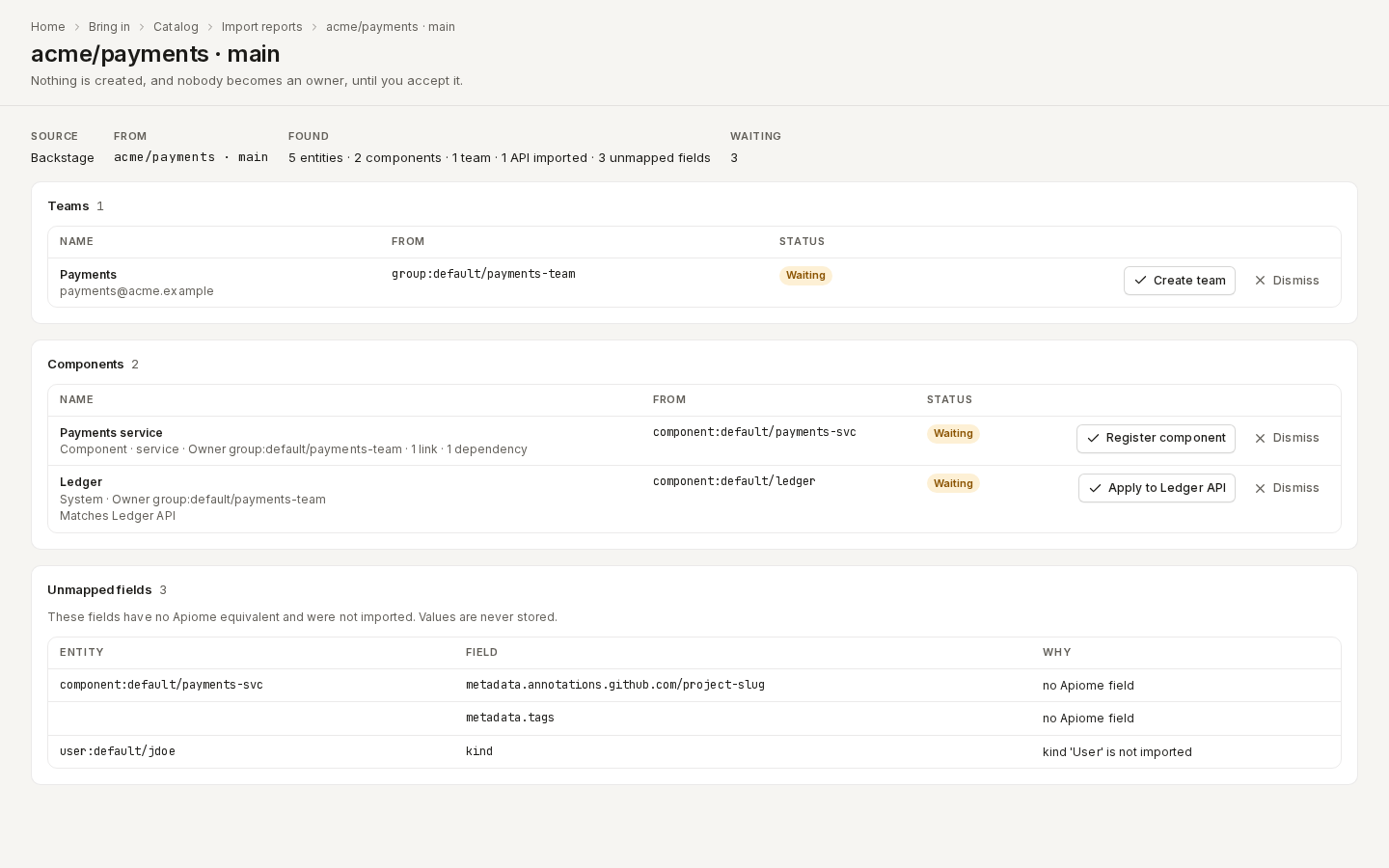
/ade/dashboard/catalog/imports/11111111-1111-4111-8111-111111111111The report has three sections:
- Teams — each team suggestion. “Create team” creates it with the imported description, email and links; “Use team” appears instead when a team already has its slug, and links that team.
- Components — each component suggestion, with its type, owner, links and dependencies. “Register component” adds it to the catalog; “Apply to …” appears for a match.
- Unmapped fields — every field that has no Apiome equivalent: the entity, the field's path and why. Annotations, labels, tags and custom fields are listed key by key. Values are never stored.
To accept a suggestion:
- Click its button (for example “Create team”).
- Change the Name or Slug if you like.
- Click the button in the dialog to confirm.
“Dismiss” removes a suggestion from the waiting list; later scans and uploads keep it dismissed. You need imports: create to decide, and teams: create to accept a team.
Owners stay suggestions
Accepting a team never makes it an owner on its own. Apiome adds it as a suggested owner of every API, Project and component the import says it owns. You confirm each one in that entity's Owner section. An owner whose team already exists is suggested as soon as the import runs.
Matches
When a component's providesApis (Backstage) or its slug names an existing Project or catalog
item, the suggestion shows Matches … and offers “Apply to …”. That applies the owner (and,
for Compass, the dependencies) to the existing entity instead of creating a new one. To keep it
separate, tick Register it as a component of its own instead in the dialog.
Dependencies
An accepted component's dependencies on a Project, catalog item or accepted component become declared edges. A dependency on something that is not in the catalog yet stays unresolved, and resolves on its own once you accept that component.
Re-scans and new uploads
- A suggestion is refreshed, never duplicated, and keeps your decision.
- An accepted Backstage component follows its file: its fields and dependencies are rewritten on every scan.
- A waiting suggestion that the file no longer declares disappears.
- An unchanged API definition is not imported again.
- When a branch no longer has any
catalog-infofile, its report goes. Accepted components stay.
Components
Route/ade/dashboard/catalog/components/[slug]
An accepted component is a catalog entity of the kind Components: Click the Components tile on the catalog home. Its page shows the Kind, Type, Lifecycle, what it is Part of, where it was Imported from, its Links, its Owner and its facts. “Open the dependency graph” shows its dependencies.
With the API
GET /v1/tenants/{tenant}/catalog-migrationslists the reports.GET /v1/tenants/{tenant}/catalog-migrations/{id}reads one report, with its suggestions and unmapped fields.POST /v1/tenants/{tenant}/catalog-migrations/compassuploads{filename, content}.POST /v1/tenants/{tenant}/catalog-migration-suggestions/{id}/acceptaccepts, taking an optional{name, slug, asComponent}.…/dismissdismisses.GET /v1/tenants/{tenant}/catalog-components/{slug}reads a component.
See the REST reference.