Contribute to the docs
This site is the apiome-docs/ workspace in the Apiome repository. Documentation is part of the
definition of done: every change to the product updates its pages in the same pull request, and
yarn docs:check runs on every pull request and must pass before it merges.
Every issue carries a Documentation (Docusaurus) section listing what its pull request owes the docs — pages, screenshots, reference, release notes and the gate — and the pull request checklist below is the same list.
Where docs live
| What | Where |
|---|---|
| How to use Apiome — every page of this site | apiome-docs/docs/ |
| Contributor references that code points at by path (SPI guides, wire contracts, the sign-in provider guide) | apiome-rest/docs/, apiome-mcp/docs/ and a few files in apiome-ui/docs/ and apiome-db/docs/ |
| Old implementation notes — fix summaries, feature write-ups, test journeys | docs/archive/, read-only |
The archive is history: it does not describe the product as it is. Its inventory lists every triaged file and the page of this site that now covers its area.
Do not add Markdown notes beside the code. scripts/check-loose-docs.sh runs on every pull
request and fails when a new .md appears under apiome-*/docs/ — other than README.md,
CHANGELOG.md and AGENTS.md — unless it is listed in scripts/loose-docs-allowlist.txt. Write a
page here instead; add an allow-list line only for a contributor reference that code points at.
Run the site
From the repository root:
| Command | What it does |
|---|---|
yarn docs:dev | Live-reloading site at http://localhost:3200/apiome/ |
yarn docs:check | Page and screenshot rules, then the production build — what CI runs |
yarn docs:screenshots | Recapture the product screenshots |
yarn workspace apiome-docs test | Unit tests for the rules and components |
Write a page
The site is four guides, each with its own sidebar: the User guide (getting-started, build,
bring-in, ship, govern, workspace), the Administration guide (admin), the CLI
(reference/cli-quickstart.md and reference/cli/) and the Reference (the rest of
reference/). Pick the guide its reader is in, then the group:
- Add
docs/<group>/<page>.md— or.mdxwhen the page uses a component such as<Screenshot/>. - Give it front matter:
title, adescriptionof 14 words or fewer,sidebar_positionandtags. - Write steps with bold UI nouns (“click Import to catalog”) and quote buttons as they read in the product.
The workspace README covers the groups, the components and the generated pages in full.
Some pages are generated and say so in their front matter (generated:): the REST, CLI and MCP
references under Reference, the CI action pages, the supported-formats table and the
lint-rule catalogs. Change the code they come from and rerun the generator named on
Reference — a hand edit is overwritten, and CI fails until the page matches its source.
Regenerate the reference
The Reference pages for the REST API, the CLI and the MCP server are generated from their source. When a pull request changes one of them, rerun its generator and commit the pages:
| You changed | Run |
|---|---|
A REST endpoint (apiome-rest/openapi.yaml) — bump its info.version too | cd apiome-rest && uv run python scripts/generate_rest_reference_docs.py |
| A CLI command or option | cd apiome-cli && uv run python scripts/generate_cli_reference_docs.py |
| An MCP tool, resource or prompt | cd apiome-mcp && uv run python scripts/generate_mcp_reference_docs.py |
The diff-action or mock-action README | yarn workspace apiome-docs sync:action-pages |
CI reruns each generator with --check and fails when a committed page no longer matches.
Add a screenshot
Screenshots are never pasted by hand: each one is an entry in apiome-docs/screens.json, captured
by a script in a light and a dark theme, and retaken every week.
-
Add an entry to
screens.json:{"id": "catalog","route": "/ade/dashboard/catalog","waitFor": "[data-testid=\"page-header\"]","mask": ["time"],"data": "golden-path","fallback": "fixture:hive-catalog/table.html"} -
Capture it:
yarn docs:screenshots -- --id catalog. This writesstatic/img/screens/catalog.light.pngandcatalog.dark.png; commit both. -
Place it on an
.mdxpage:<Screenshot id="catalog" alt="The Catalog page listing four imported items" />
The result looks like this — switch the site theme to see the dark capture:
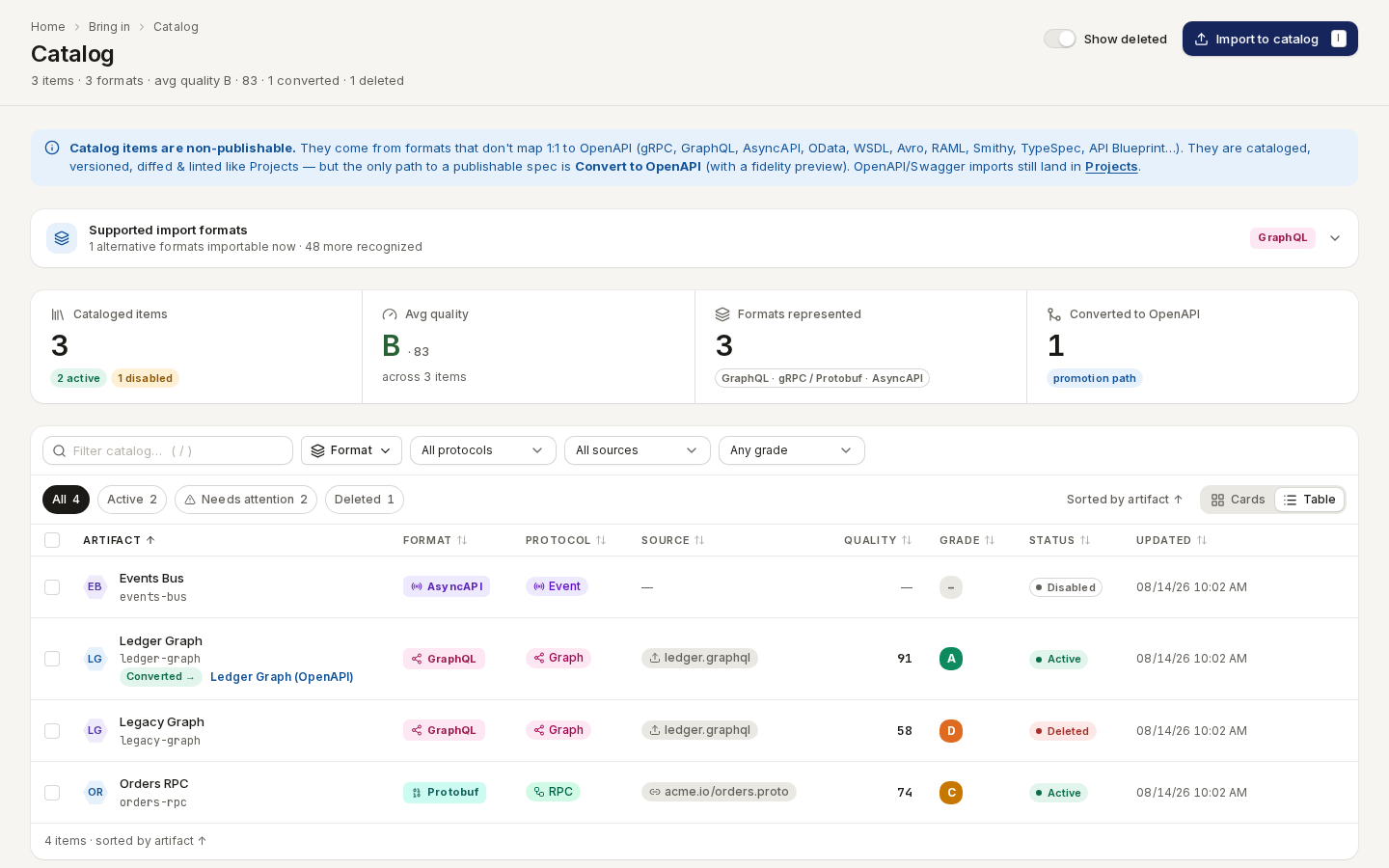
/ade/dashboard/catalogThe catalog, captured from the committed fixture.Manifest fields
| Field | Required | Meaning |
|---|---|---|
id | yes | Lower-case words joined by hyphens; also the image file name |
route | yes | The product route the screen shows; it is opened in golden-path mode and shown as the route badge |
waitFor | yes | CSS selector that is visible once the screen is ready |
data | yes | "golden-path" (the real route, signed in to the seeded stack), "signed-out" (the real route with no session, such as /login — needs only apiome-ui) or "fixture:<dir>/<file>.html" (a dump from apiome-ui/e2e/fixtures/) |
fallback | no | For a golden-path entry: the fixture to use when the stack is not running |
mask | no | CSS selectors painted over before the capture — dates, ids and counts that change between runs |
clip | no | {"x", "y", "width", "height"} to capture one region instead of the viewport |
theme | no | ["light", "dark"] (default); a page can only show an entry that has both |
viewport | no | Default {"width": 1440, "height": 900} |
density | no | comfortable (default) or compact |
fontScale | no | md (default), or xs, sm, lg, xl |
appTheme | no | A product theme — light, dark, high-contrast, blueprint, whiteboard, solarized, nord or darcula — pinned in both captures, whatever the site theme. For theme galleries |
sources | no | Repository paths whose changes make the image stale. Defaults to the route's folder under apiome-ui/src/app/; list the component instead when the screen is a dialog or a shared panel, e.g. ["apiome-ui/src/app/components/ade/WhatsNewDialog.tsx"] |
tags | no | ["legacy"] marks a surface that predates the Hive redesign (#5272): a page showing it needs the <Legacy/> callout, and the weekly refresh lists it when its image changes |
Next.js's development overlay is hidden in every capture. Every capture runs with the clock fixed at 15 June 2026, 09:30 UTC, and with motion off, so two runs produce the same pixels.
Where the pixels come from
- Golden-path mode signs in as the seeded user (
ada@example.com) and opens the real route. It needs the golden-path stack —scripts/golden_path/run.sh --keepbrings it up, or pass--boot— and an apiome-ui pointed at it. - Signed-out entries open their route without signing in, so they work with or without the stack.
- Fixture mode mounts a committed dump of the page into the sign-in route, which loads the
app's real styles and needs no database. Entries with a
fallbackuse it when the stack is down.
| Option | Use |
|---|---|
--id <id> | Capture one entry; repeat it or separate ids with commas |
--route <prefix> | Capture every entry whose route starts with the prefix |
--start-ui | Start an apiome-ui dev server on port 3300 for the run |
--ui-url <url> | Capture from an apiome-ui that is already running (default http://localhost:3300) |
--boot | Bring the golden-path stack up first when it is not running |
--fixtures-only | Use fixtures even when the stack is up |
Set DOCS_CHROMIUM_PATH to a Chromium executable if Playwright's own browser is not installed. The
script exits with an error when any selected entry could not be captured.
What the gate checks
yarn docs:check fails when:
- a page has no
titleordescription, or the description is over 14 words; - a page is an orphan — in no sidebar: directly in
docs/instead of a group folder, or hidden withunlisted: true,draft: trueordisplayed_sidebar: null; - an internal link is broken — a relative link to a page that does not exist, or a site path such
as
/ship/export-a-specthat nothing serves. The build then checks every anchor too; - a manifest entry is invalid, or is missing the image for a theme it declares;
- a page uses
<Screenshot id/>with an id that is not in the manifest, or that lacks a light or a dark image; - a page shows a screenshot tagged
legacywithout the<Legacy/>callout; - a screenshot is stale: it was captured before the last two releases closed and the code behind
its route (or its
sources) changed since. Recapture it withyarn docs:screenshots -- --id <id>; - the REST reference was generated from an older
apiome-rest/openapi.yaml.
The build itself fails when a <Screenshot/> has no alt text. The message names the page, the
link or the screenshot id, and the command that fixes it.
The weekly refresh
The Apiome Docs Screenshots workflow runs every Monday (and on demand). It brings up the
golden-path stack, recaptures every entry, and opens a pull request when any image changed. The pull
request lists any changed legacy screen, since that usually means its redesign has landed.
Pull request checklist
Paste this into the pull request description and tick what applies; say why for anything that does not:
### Documentation
- [ ] Pages: <paths under apiome-docs/docs/ added or changed>
- [ ] Screenshots: <ids added or recaptured with `yarn docs:screenshots -- --id <id>`>
- [ ] Reference: <REST / CLI / MCP pages regenerated, or "no REST, CLI or MCP change">
- [ ] Release notes: <apiome-rest/CHANGELOG.md entry, release-notes post, What's new line>
- [ ] `yarn docs:check` passes